Home
Compliance

Fit for Duty Assessment

Risk-Based Pre-Shift Fitness Checks with Automated Decision Support

Ensure every driver is fit to operate safely with Hubfleet's risk-based fit-for-duty assessment. Drivers complete a daily self-assessment with configurable questions, receiving a fitness score out of 100. The system automatically compares scores against your configured risk thresholds to start shifts, escalate to supervisors, or block unsafe operations.

Daily Assessments | Risk-Based Scoring | Automated Actions | Complete Audit Trail

Icon
Configurable fitness questions for your operations
Icon
Automated risk-based decision workflows

Why Fit for Duty Matters Under HVNL

A driver may hold a valid license and be compliant with Electronic Work Diary (EWD) hours — but still be unfit to drive safely due to fatigue, illness, medication, or other factors.
Under HVNL Reform Compliance Guide's, Safety Management System requirements (Outcome Area 3: People), operators must have systematic processes to assess whether personnel are fit to perform their duties safely — and evidence that those processes are operating effectively.
Hubfleet replaces informal verbal checks with a documented, risk-scored assessment that provides consistent decision-making, automated workflows, and a complete audit trail for every shift.
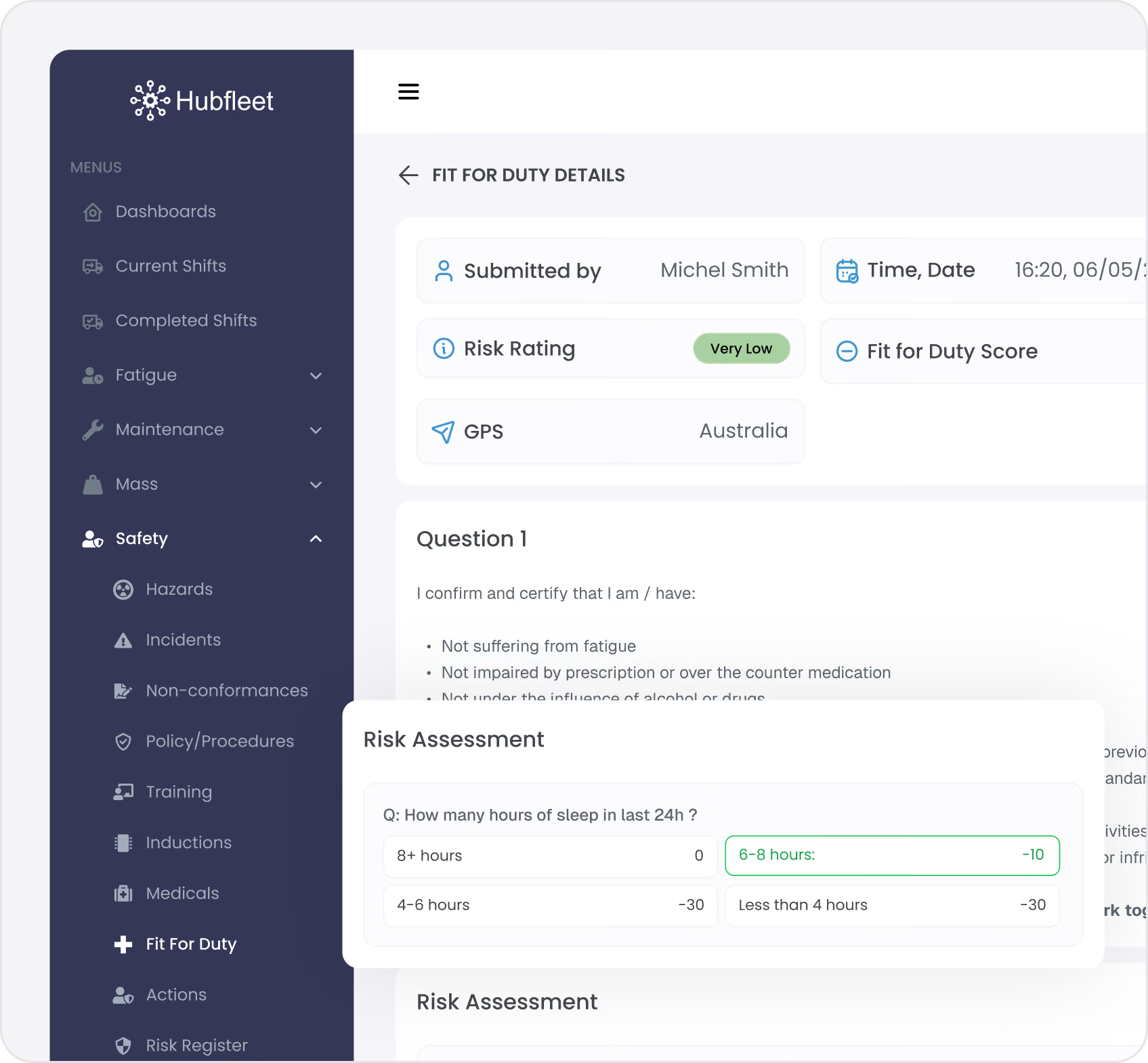
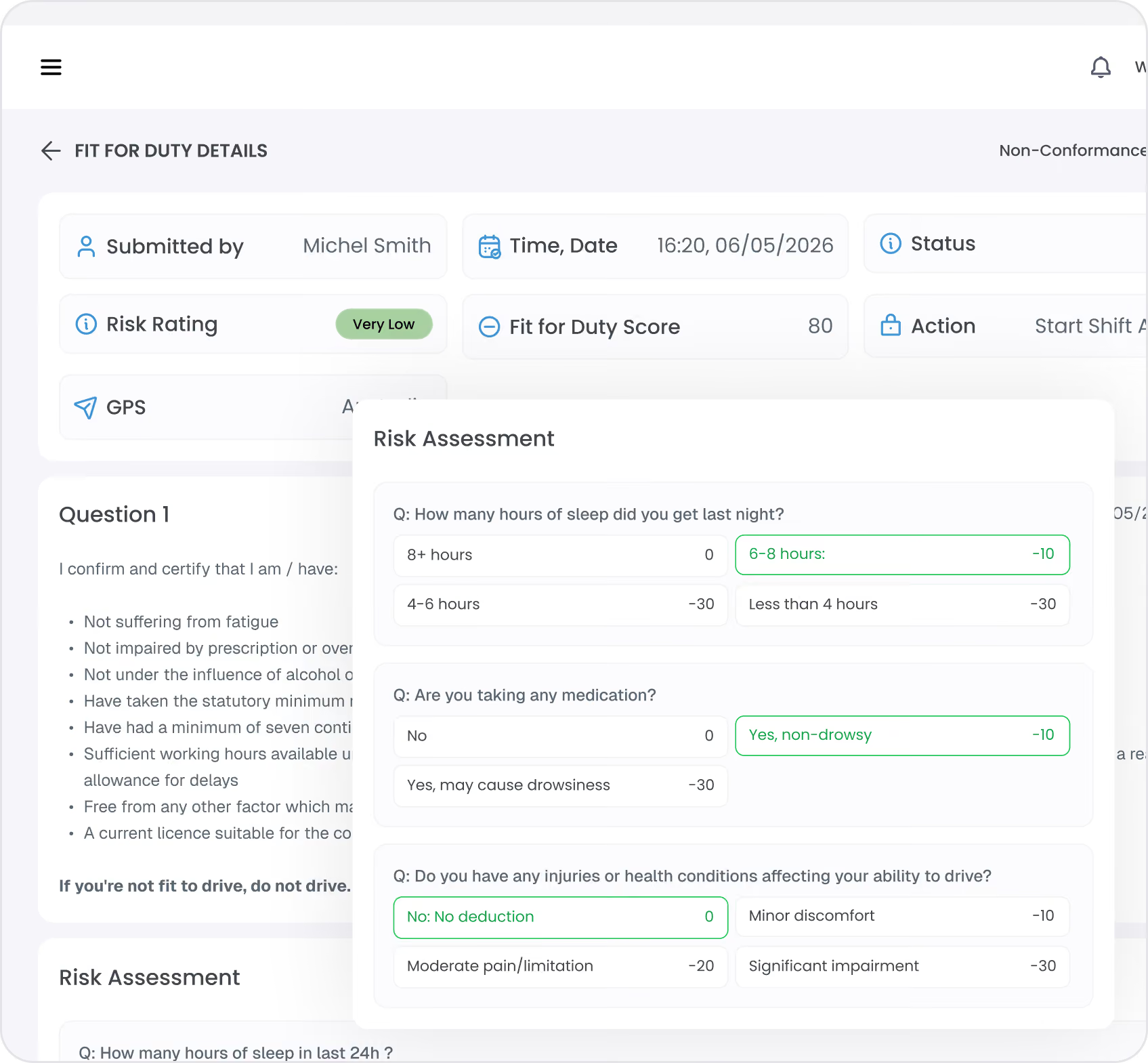
How Hubfleet's Risk-Based Scoring Works:

How does Fit for Duty scoring relate to the 5×5 risk matrix? Hubfleet's safety modules (hazards, incidents, NCRs) use a 5×5 likelihood × severity risk matrix to assess event-based risks. Fit for Duty uses a different methodology — cumulative point deductions from a starting score of 100 — because it assesses a driver's current fitness state rather than an event. Both systems produce the same 5-level risk output (Very Low through Very High) with consistent labels, colours, and automated actions across the entire platform.

The 100-Point Fitness Score

Every driver starts each day with a fitness score of 100 points.
Assessment Process:
  • Driver completes pre-shift self-assessment on mobile app
  • Multiple choice questions configured by operator
  • Each response has a point deduction value
  • System calculates final fitness score
  • Score compared against operator's risk matrix
  • Automated action triggered based on risk level
Example Questions:
  • How many hours of sleep did you get last night?
    • 8+ hours: No deduction
    • 6-8 hours: Minor deduction
    • 4-6 hours: Moderate deduction
    • Less than 4 hours: Major deduction
  • Are you taking any medication?
    • No: No deduction
    • Yes, non-drowsy: Minor deduction
    • Yes, may cause drowsiness: Moderate deduction
  • Do you have any injuries or health conditions affecting your ability to drive?
    • No: No deduction
    • Minor discomfort: Minor deduction
    • Moderate pain/limitation: Moderate deduction
    • Significant impairment: Major deduction
  • Have you consumed alcohol in the past 12 hours?
    • No: No deduction
    • Yes: Major deduction (automatic supervisor review)
Final Score Calculation:
Starting score (100) − Total deductions = Final fitness scoreOperators set the exact point values for each response to match their risk appetite and operational context.
Configurable Questions for Your Operations
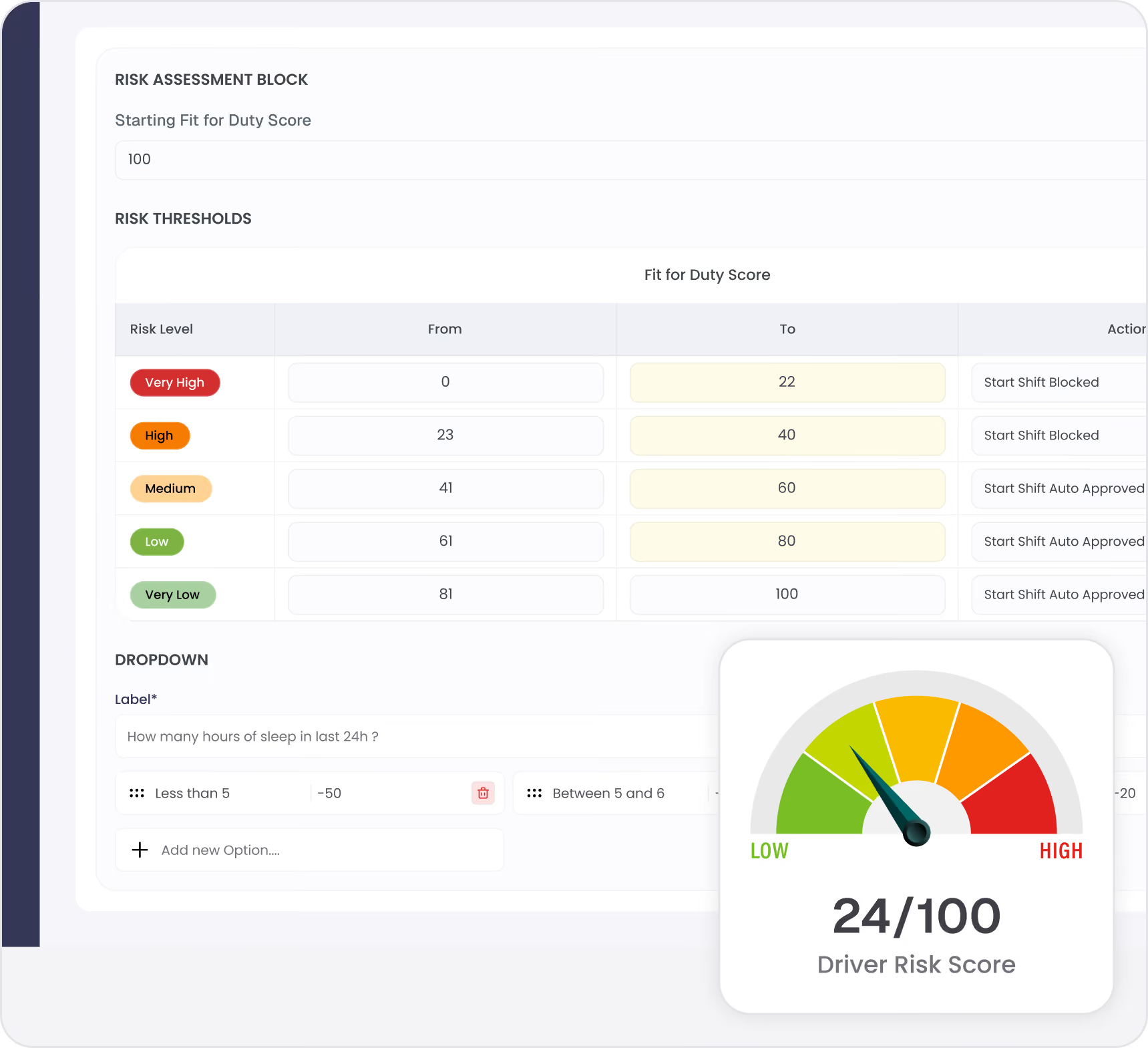
Operators create custom questions with multiple choice responses and assign point deductions to each answer. All questions are mandatory — drivers cannot skip questions or submit a partial assessment, ensuring the fitness score is always based on the full picture.
Risk Levels and Automated Actions

Operator-Configurable Risk Thresholds

Hubfleet uses a fixed 5-level risk system across the entire platform. The numerical scoring is fixed to ensure consistent, comparable risk measurement over time. The default level labels are Very Low, Low, Medium, High, and Very High — but operators can rename the labels to match their own terminology (e.g. relabel "Very High" as "Extreme").
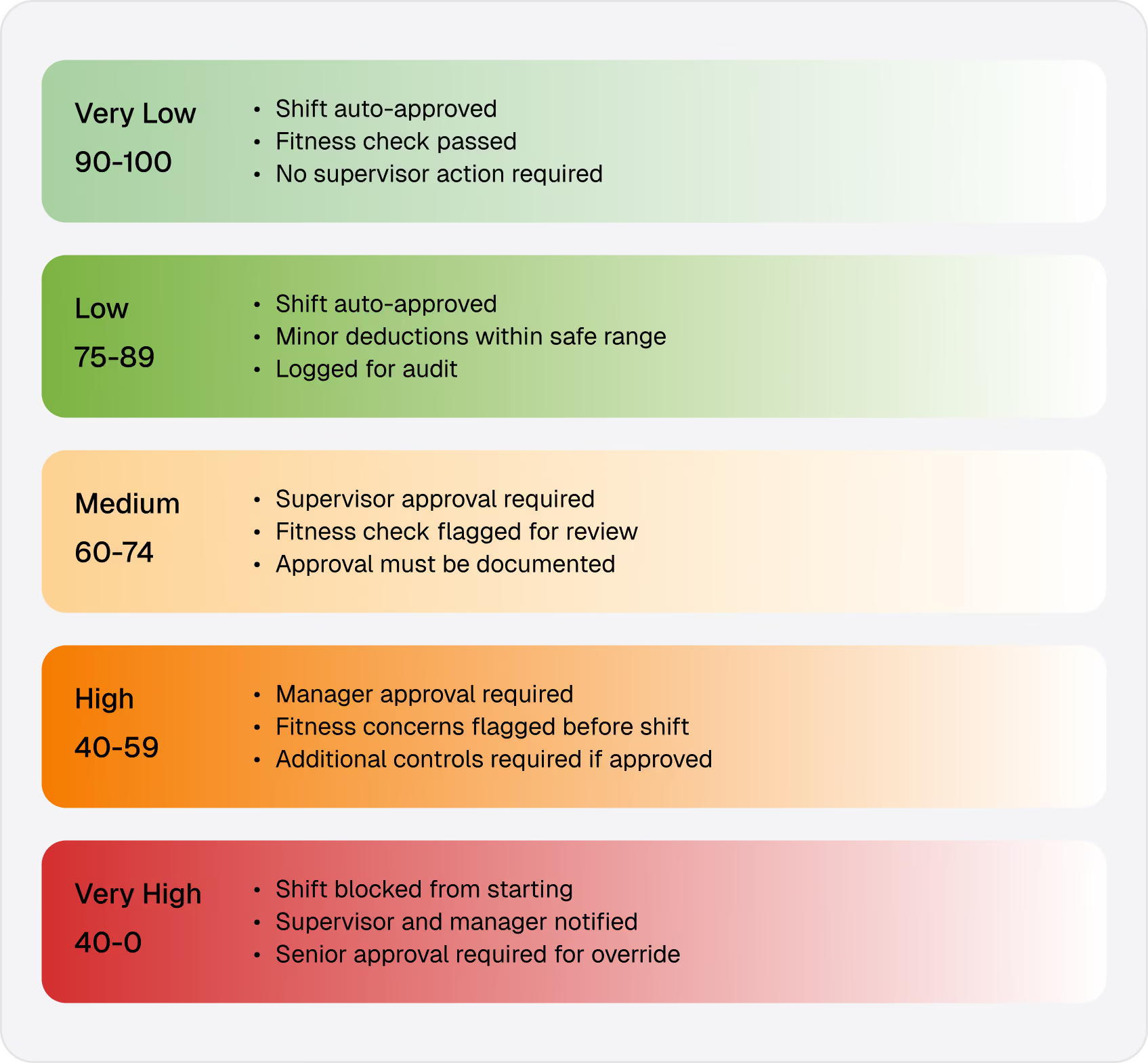
Operators define score thresholds and automated actions for each of the 5 risk levels:
Example Risk Levels (default thresholds — operator-configurable):
90-100 Points: Very Low Risk 🟢
  • Automated Action: Start shift approved automatically
  • Driver Notification: "Fitness check complete. Safe to start shift."
  • No supervisor intervention required
  • Recorded for audit trail
75-89 Points: Low Risk 🟢
  • Automated Action: Start shift approved automatically
  • Driver Notification: "Fitness check complete. Safe to start shift."
  • Recorded for audit trail
  • Minor deductions noted but within safe operating range
60-74 Points: Medium Risk 🟡
  • Automated Action: Start shift approved automatically
  • Driver Notification: "Fitness check flagged. Supervisor review needed."
  • Supervisor receives alert with:

    - Driver fitness score

    - Questions and responses

    - Point deductions breakdown

    - Recommended controls
  • Supervisor approves or rejects with documented reason
  • Controls verified before approval (additional breaks, reduced hours, etc.)
40-59 Points: High Risk 🟠
  • Automated Action: Manager approval required
  • Driver Notification: "Fitness check flagged. Manager review required before shift start."
  • Manager receives alert with full assessment breakdown
  • Documented justification required for approval
  • Enhanced controls mandatory if approved (reduced hours, additional breaks, buddy system)
Below 40 Points: Very High Risk 🔴
  • Automated Action: Shift blocked — cannot start
  • Driver Notification: "Unable to start shift. Contact supervisor immediately."
  • Supervisor and manager notified immediately
  • Override requires senior management with documented justification
  • Alternative arrangements needed (replacement driver, delayed start, etc.)
Threshold Configuration
Operators customize thresholds to match:
  • Risk appetite and safety culture
  • Operation complexity and hazards
  • Regulatory requirements
  • Historical incident data
  • Industry benchmarks
Adjustment Over Time:
  • Monitor effectiveness of thresholds
  • Adjust based on incident correlation
  • Refine as operations evolve
  • Seasonal adjustments (agriculture, construction)
Configuration and Customization

Fully Configurable to Your Operations

Set your risk thresholds, create your assessment questions, configure approval workflows and notifications, and go live. Most operators are fully operational within 2–4 weeks.
Everything is adjustable over time — refine thresholds based on real data, add questions for new risk factors, and tune point deductions as your operations evolve.
Integration with SMS Outcome Area 3: People

HVNL SMS Requirements

Fit for Duty directly addresses multiple HVNL requirements:
Outcome Area 3: People
  • Fitness-for-Duty Checks: Daily systematic assessment
  • Self-Assessment Criteria: Defined questions and thresholds
  • Supervisor Review: Process for marginal assessments
  • Records Maintained: Complete audit trail of daily checks
Outcome Area 2: Risk Management
  • Risk Identification: Fitness hazards identified daily
  • Risk Assessment: Standardized scoring and risk levels
  • Risk Controls: Automated actions based on risk
  • Monitoring: Trend analysis and pattern detection
Use the HVNL Reform Gap Assessment to identify where your current fitness processes need strengthening.v
Evidence for NHVR Audits
Daily Assessment Records:
  • Complete history of all fitness checks
  • Timestamps and GPS locations
  • Questions and responses
  • Scores and risk levels
  • Actions taken (approved/blocked)
Supervisor Approvals:
  • Medium risk approvals documented
  • Justifications and controls specified
  • Override records with reasons
  • Follow-up actions tracked
Trend Analysis:
  • Fitness score distributions over time
  • Common fitness issues by driver/fleet
  • Correlation with incidents
  • Effectiveness of thresholds and controls
Corrective Actions:
  • Patterns triggering investigations
  • Root cause analysis for recurring issues
  • Controls implemented to address trends
  • Effectiveness verification
PSOE Compliance
Present
Fit for duty process documented in your Policies & Procedures Management and configured
Suitable
Risk thresholds appropriate for your operations and risks
Operating
Daily assessments completed by all drivers before shifts
Effective
Data shows fitness issues identified and managed, incident correlation analyzed — see Audit Readiness for how to prepare your evidence

Frequently asked questions

How does the 100-point scoring system work?
Every driver starts each day with 100 points. As they answer fitness questions, points are deducted based on their responses. For example, 8+ hours sleep = 0 points deducted, 4-6 hours = -15 points. The final score is compared against a fixed 5-level risk matrix (Very Low, Low, Medium, High, Very High) to determine the automated action: auto-approve, supervisor approval, manager approval, or shift blocked. The 5 levels use fixed numerical scoring for consistency, but operators can rename the labels to match their own terminology.
Can we customize the questions and point deductions?
Yes. We'll import historical service records to maintain accurate maintenance tracking from day one.
What happens if a driver scores in the medium risk range?
Yes. We'll import historical service records to maintain accurate maintenance tracking from day one.
Can a high-risk assessment be overridden?
Yes. We'll import historical service records to maintain accurate maintenance tracking from day one.
How does fit for duty integrate with our SMS?
Yes. We'll import historical service records to maintain accurate maintenance tracking from day one.
What if drivers are dishonest in their assessments?
Yes. We'll import historical service records to maintain accurate maintenance tracking from day one.
How long does the assessment take?
Yes. We'll import historical service records to maintain accurate maintenance tracking from day one.
Can we use fit for duty offline?
Yes. We'll import historical service records to maintain accurate maintenance tracking from day one.
Get Started in Days, Not Months
Free guides, tools, and frameworks to start preparing for HVNL today — built by Australian compliance specialists and trusted by 500+ fleets.
Blue binder or folder with three horizontal black lines on the front cover.
HVNL Compliance Guide
What HVNL means for your fleet — explained in plain English
  • All 5 SMS outcome areas explained
  • Implementation timeline & milestones
  • Fleet preparation checklist
  • Gap assessment framework
  • Change summary from current HVNL
Read the Guide
HVNL Compliance Toolkit
Free downloadable templates to start preparing today.
  • Gap analysis template (5 outcome areas)
  • Pre-audit readiness checklist
  • SMS implementation tracker
  • PSOE evidence mapping
  • Implementation timeline template
Get the Free Toolkit
Audit Preparation Guide
The questions NHVR auditors ask — and where to find your answers.
  • Common auditor questions by outcome area
  • Direct answers showing where evidence sits in Hubfleet
  • PSOE framework explained
  • Audit-day preparation checklist
  • Real auditor scenarios
Read the Audit Guide

Systematic Fitness Management for HVNL

100-point scoring system
Clear, objective fitness assessment
Configurable questions
Tailored to your operations and risks
Risk threshold integration
Automated actions based on fitness score
Supervisor workflows
Efficient approval for medium-risk cases
Complete audit trail
Every assessment documented for NHVR
SMS integration
Addresses Outcome Area 3: People requirements
Trend analysis
Data-driven insights for continuous improvement

Prevent unfit drivers from starting shifts. Implement systematic fitness management with Hubfleet.

Stylized blue paper airplane icon with shadow on transparent background.
Start Free Trial
Recommended for most fleets
Best if you're ready to get drivers logging now and explore Hubfleet at your own pace.
Icon
Full platform access — every feature, no limits
Icon
Drivers can start on EWD today
Icon
Real EWD, SMS, and compliance reporting from day one
Icon
No upfront costs · No lock-in contract
Start Free Trial
Icon of a calendar with blue top binder and dark gray date display area.
Book your Demo
Best for larger fleets or complex setups
Best if you've got specific integration questions, multiple sites, or want a tailored walkthrough first.
Icon
Tailored to your fleet and use case
Icon
30 minutes with a Hubfleet specialist
Icon
See the platform mapped against your fleet's compliance obligations
Icon
Get HVNL and SMS questions answered live
Book your 30-Minute Demo
Want to see plans first?
Icon
500+ Australian operators
Icon
NHVR approved
Icon
Free trial
Icon
Australian-based support