

Prepare for Your NHVR SMS Audit with Confidence
Know exactly what auditors will ask and where to find your answers in Hubfleet.
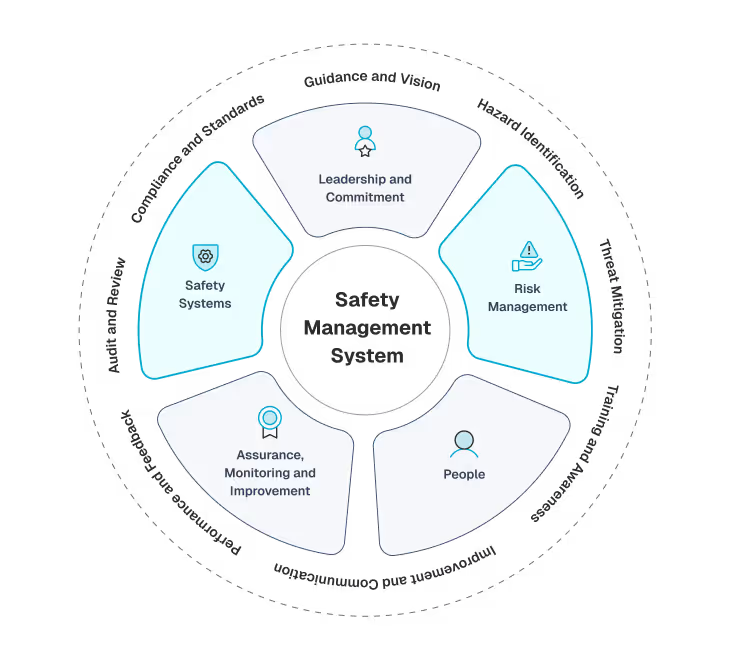
NHVR auditors assess your Safety Management System against the 5 SMS outcome areas defined in the SMS Standard. During an audit, they ask specific questions to evaluate whether your SMS is Present, Suitable, Operating, and Effective (PSOE).
This guide maps common auditor questions to where you'll find the evidence in Hubfleet, helping you prepare for a successful audit.
Looking for a high-level overview? See our Audit Readiness page for how Hubfleet automates audit evidence collection and reporting.
Audit Success with Hubfleet

Access all your PSOE evidence in one platform
Show real-time operational data — not static reports
Demonstrate systematic safety management across all 5 outcome areas
Walk auditors through live system usage with confidence
How to Use This Guide
Review each section to understand what auditors will ask and ensure you can access the evidence in Hubfleet before your audit date.
Outcome Area 1
Leadership & Commitment
What Auditors Look For
Auditors assess whether senior management actively leads safety and creates a positive safety culture. They want to see that safety is a management priority, not just a compliance checkbox.
Common Auditor Questions
"Show me your organizational structure with safety roles defined"
Where to find it in Hubfleet:
- Settings → Safety Categories — each category has an assigned safety leader responsible for that area
- An overall safety leader is assigned at the organisation level
- Escalation contacts are configured for high-risk items, ensuring the right people are notified when risk thresholds are exceeded
PSOE Evidence:
- Present: Safety leaders defined for each category and overall
- Suitable: Roles match your operation's size and complexity
- Operating: Current employees are assigned and actively receiving notifications
- Effective: Escalation contacts ensure high-risk items reach senior management
"Where is your safety policy and who signed it?"
Where to find it in Hubfleet:
- Policies & Procedures Management → Safety Policy
- Digital signature from senior management
- Distribution records showing who received it
- Acknowledgment tracking with dates
PSOE Evidence:
- Present: Safety policy documented and signed
- Suitable: Policy covers your specific operations and risks
- Operating: Policy distributed to all staff with acknowledgments
- Effective: Policy reviewed annually and updated when needed
"What are your safety KPIs and how does management review them?"
Where to find it in Hubfleet:
Hubfleet tracks the operational data that feeds your safety KPIs across every module:
- Fatigue: Breach counts, extended fatigue hours requests, split rest usage — all tracked in the EWD
- Incidents & Hazards: Incident and hazard volumes, severity, and closure rates in the risk register
- Maintenance: Pre-start completion rates, open faults, overdue work orders
- Training: Completion rates and expiry status by role
Management can review this data across modules and use it as evidence of KPI monitoring during audits.
PSOE Evidence:
- Present: Operational data tracked across all SMS areas
- Suitable: Data covers leading and lagging safety indicators
- Operating: Data updated automatically from daily operations
- Effective: Trends in operational data demonstrate safety improvement
"Show me evidence of management reviews"
Where to find it in Hubfleet:
Hubfleet provides the data and evidence that supports your management review process:
- Risk register showing current risk status, controls, and trends
- Corrective Action Register (CAR) with open/completed actions and due dates
- Incident and hazard data demonstrating what's happened since the last review
- Training and certification status showing workforce competency
- Policy acknowledgment records confirming communication effectiveness
Use this data to run structured management reviews and document outcomes in your policy library.
PSOE Evidence:
- Present: All SMS data accessible for management review
- Suitable: Data covers all 5 outcome areas for comprehensive reviews
- Operating: Real-time data available for review at any time
- Effective: Corrective actions from reviews tracked to completion in the CAR
Outcome Area 2
Risk Management
What Auditors Look For
Auditors want to see systematic identification, assessment, and control of safety risks. They're looking for evidence that you proactively manage risks, not just react to incidents.
Common Auditor Questions
"How do you identify safety hazards in your operation?"
Where to find it in Hubfleet:
- Risk Management → Hazard Register
- Mobile hazard reporting from drivers and staff
- Hazard categorization and risk ratings
- Photos and GPS location stamps
PSOE Evidence:
- Present: Hazard reporting system exists
- Suitable: System accessible to all staff including drivers
- Operating: Regular hazard reports being submitted
- Effective: Hazards identified before incidents occur
"Show me your risk register"
Where to find it in Hubfleet:
- Risk Management → Risk Register
- Unified register covering all risk sources (hazards, incidents, NCRs, faults)
- Risk assessment matrix with likelihood and severity
- Assigned risk owners
- Control measures linked to each risk (see Risk Controls)
PSOE Evidence:
- Present: Comprehensive risk register maintained
- Suitable: Covers all activities and contexts in your operation
- Operating: Register updated when new risks identified
- Effective: High risks have effective controls implemented
"How do you assess and rate risks?"
Where to find it in Hubfleet:
- Risk Management → Assessment Methodology
- Risk matrix (likelihood × consequence)
- Standardized rating system
- Risk assessment workflow
PSOE Evidence:
- Present: Documented risk assessment method
- Suitable: Method appropriate for transport risks
- Operating: All risks assessed using consistent methodology
- Effective: Risk ratings drive priority of controls
"Show me your incident investigation process"
Where to find it in Hubfleet:
- Risk Management → Incident Investigation section for documenting findings and outcomes
- Risk Management → Hazard Risk Management section for assessing and rating identified hazards
- Corrective actions created from investigations and linked to the Corrective Action Register
- Evidence attachments including photos, statements, and supporting documents
PSOE Evidence:
- Present: Investigation and risk management process documented
- Suitable: Investigation depth matches incident severity
- Operating: All incidents investigated with findings documented
- Effective: Corrective actions prevent recurrence
Outcome Area 3
People
What Auditors Look For
Auditors assess whether your people are competent, fit-for-duty, and understand their safety responsibilities. They want to see systematic management of training, qualifications, and fitness.
Common Auditor Questions
"How do you verify driver licenses and qualifications?"
Where to find it in Hubfleet:
- Custom roles — create roles for different license types (e.g. HC, MC, HR) and assign drivers accordingly, so you can track who holds which license class
- Mobile hazard reporting from drive License expiry tracking — license expiry dates are tracked with automatic reminders before they lapsers and staff
- Custom forms — use custom forms to capture license images or other verification evidence from drivers
- Medical certificates — stored in the driver register with expiry tracking
PSOE Evidence:
- Present: License types tracked via roles, expiry dates monitored
- Suitable: Custom roles match your operation's specific license requirementsSystem accessible to all staff including drivers
- Operating: Expiry alerts ensure no drivers slip through the cracks
- Effective: No drivers operating with expired licenses
"Show me your training records"
Where to find it in Hubfleet:
- Training & Competency Assessment → Training Register
- Training requirements by role
- Completion records with certificates
- Training expiry tracking
- Training history for each person
PSOE Evidence:
- Present: Training requirements defined and documented
- Suitable: Training relevant to roles and risks
- Operating: Training delivered and completion tracked
- Effective: Trained personnel demonstrate competency
"How do you assess fitness-for-duty?"
Where to find it in Hubfleet:
- Fit for Duty → Fitness Check
- Daily fitness-for-duty self-assessment
- Supervisor review for marginal assessments
- Complete fitness check history
- Declarations with timestamps
PSOE Evidence:
- Present: Fitness-for-duty check process documented
- Suitable: Covers fatigue, illness, injury, medication, impairment
- Operating: Daily checks completed before each shift
- Effective: Unfit drivers removed from duty
"Where are your medical certificates stored?"
Where to find it in Hubfleet:
- Fit for Duty → Medical Certificates
- Medical certificate uploads
- Expiry tracking with reminders
- Medical clearance documentation
- Conditional license tracking
PSOE Evidence:
- Present: Medical certificate repository
- Suitable: Tracks all required medical certifications
- Operating: Current certificates on file
- Effective: No drivers working with expired medical clearance
"How do you communicate safety information to staff?"
Where to find it in Hubfleet:
- Policies & Procedures Management → Distribution & Acknowledgment
- Safety bulletins and notifications
- Read receipts and acknowledgment tracking
- Meeting records and attendance
- Communication logs
PSOE Evidence:
- Present: Communication process documented
- Suitable: Multiple channels for different message types
- Operating: Regular communication with acknowledgment tracking
- Effective: Staff demonstrate awareness of safety information
Outcome Area 4
Assurance
What Auditors Look For
Auditors want to see that you monitor your SMS performance, conduct internal audits, track corrective actions, and continuously improve. They're assessing whether you can demonstrate your SMS is effective.
Common Auditor Questions
"What KPIs do you monitor?"
Where to find it in Hubfleet:
Hubfleet captures the operational data that forms the basis of your safety KPIs:
- Leading indicators: Hazard reports submitted, pre-start completion rates, policy acknowledgments, training completions
- Lagging indicators: Incident counts, fatigue breaches, NCRs raised, corrective action overdue rates
- All data is timestamped and traceable, providing the raw evidence auditors want to see
PSOE Evidence:
- Present: Operational data tracked across all SMS areas
- Suitable: Covers both leading and lagging indicators
- Operating: Data captured automatically from daily operations
- Effective: Trends in data demonstrate safety improvement over time
"Show me your internal audit schedule and findings"
Where to find it in Hubfleet:
Hubfleet provides the evidence base that supports your internal audit program:
- Risk register — review current risks, controls, and open items as part of your audit
- Corrective Action Register (CAR) — audit findings can be recorded as corrective actions with assigned owners and due dates
- NCRs — non-conformances identified during audits are managed through the NCR workflow
- Operational data across all modules provides auditable evidence of SMS activity
Use your policy library to store your internal audit schedule, checklists, and findings documentation.
PSOE Evidence:
- Present: Evidence base and NCR/CAR workflows support internal auditing
- Suitable: Data covers all 5 outcome areas for comprehensive audits
- Operating: Operational data demonstrates ongoing SMS activity
- Effective: Audit findings tracked through CAR to closure
"Where is your corrective action register?"
Where to find it in Hubfleet:
- Non-Conformance Reporting (NCR) → Corrective Action Register (CAR)
- All actions from incidents, audits, reviews, hazards
- Assigned responsibility and due dates
- Status tracking (open, in progress, completed)
- Effectiveness verification
PSOE Evidence:
- Present: Corrective action system exists
- Suitable: Captures actions from all sources
- Operating: Actions assigned, tracked, and completed
- Effective: Actions prevent recurrence of issues
"Can you show me your incident trends?"
Where to find it in Hubfleet:
- Risk Management → Incident Register — filter and sort by date, severity, vehicle, location and category to walk auditors through frequency and trends
- Investigation findings, root causes and contributing factors captured against each incident
- Export the register at any time for year-over-year comparison or deeper analysis
- Roll-up trend dashboards are on the way; the underlying timestamped data is being collected from day 1
PSOE Evidence:
- Present: Every incident captured with full investigation and audit trail
- Suitable: Severity, cause and category fields support trend analysis relevant to your risk profile
- Operating: All incidents logged through the workflow with consistent investigation
- Effective: Register data and exports show whether controls are reducing incident frequency and severity over time
Outcome Area 5
Safety Systems
What Auditors Look For
Auditors assess whether you have documented policies and procedures that embed safety into daily operations. They want to see that your systems integrate with your business, not sit in a binder unused.
Common Auditor Questions
"Where is your policy library?"
Where to find it in Hubfleet:
- Policies & Procedures Management → Policy Library
- Categorized policies and procedures
- Digital access for all staff (web and mobile)
- Searchable policy database
- Version control — approved policies are immutable; updates require a new version with fresh acknowledgments from all users
- Review cycles for scheduled policy and procedure reviews
PSOE Evidence:
- Present: Complete policy library covering all risk areas
- Suitable: Policies relevant to your operation and risks
- Operating: Policies distributed with acknowledgment tracking; review cycles ensure regular updates
- Effective: Staff always acknowledge the current version; old acknowledgments don't carry over
"Show me your procedures"
Where to find it in Hubfleet:
- Policies & Procedures Management → Procedure Library
- Procedures for high-risk tasks
- Loading and restraint procedures
- Maintenance procedures
- Emergency response procedures
PSOE Evidence:
- Present: Procedures documented for all high-risk activities
- Suitable: Procedures detailed enough to guide safe work
- Operating: Staff trained on procedures and can access them
- Effective: Procedures followed in practice
"How do you manage Chain of Responsibility?"
Where to find it in Hubfleet:
- Chain of Responsibility (CoR) — Pre-trip checks with photo capture for axle weights and load details including photos as evidence
- Mass Management — Capturing loading data against trips and vehicles
- Data sharing with CoR partners — share relevant compliance data with parties in the chain
- Policies & Procedures Management — Distributed to all CoR parties with acknowledgment tracking
PSOE Evidence:
- Present: CoR evidence capture processes in place
- Suitable: Addresses your specific supply chain and loading operations
- Operating: Drivers capturing load evidence on every trip
- Effective: Photo evidence and data sharing demonstrate active CoR management
"How do you control document versions?"
Where to find it in Hubfleet:
- Immutable once approved — once a policy or procedure is approved and active, it cannot be changed, ensuring document integrity
- Replacement workflow — to update a policy, a new version is created and must go through its own approval process. The old version is archived automatically
- Fresh acknowledgments required — when a new policy replaces an old one, all users must acknowledge the new version. Acknowledgments from the previous version do not carry over
- Review cycles — policies and procedures have configurable review cycles, prompting timely reviews and updates
- Full version history maintained so auditors can see the complete lifecycle of each document
PSOE Evidence:
- Present: Version control with immutable approved documents
- Suitable: Replacement workflow ensures controlled changes with full traceability
- Operating: Review cycles prompt regular updates; fresh acknowledgments confirm staff awareness
- Effective: Auditors can verify every version, its approval, and who acknowledged it
Audit Preparation Checklist
Use this module-by-module checklist to review your Hubfleet data before the auditor arrives.
Leadership & Safety Roles
Thank you! Your submission has been received!
Oops! Something went wrong while submitting the form.
Risk & Incident Management
Thank you! Your submission has been received!
Oops! Something went wrong while submitting the form.
People & Competency
Thank you! Your submission has been received!
Oops! Something went wrong while submitting the form.
Policies & Procedures
Thank you! Your submission has been received!
Oops! Something went wrong while submitting the form.
Thank you! Your submission has been received!
Oops! Something went wrong while submitting the form.
Mass & Chain of Responsibility
Thank you! Your submission has been received!
Oops! Something went wrong while submitting the form.
Thank you! Your submission has been received!
Oops! Something went wrong while submitting the form.
Final Preparation
Thank you! Your submission has been received!
Oops! Something went wrong while submitting the form.
Table of Content
Table of Content
Overview
HVNL vs HVNL2 for Agriculture
Critical Agricultural Challenges
Major Challenges in Agriculture Transport
Hubfleet Platform
How to Implement (Step-by-Step)
KPIs & Measurement
Getting Ready for HVNL2
Conclusion & Next Steps
Get Audit-Ready with Hubfleet

Start Free Trial
Recommended for most fleets
Best if you're ready to get drivers logging now and explore Hubfleet at your own pace.

Full platform access — every feature, no limits
Drivers can start on EWD today
Real EWD, SMS, and compliance reporting from day one
No upfront costs · No lock-in contract
Start Free Trial

Book your Demo
Best for larger fleets or complex setups
Best if you've got specific integration questions, multiple sites, or want a tailored walkthrough first.
Tailored to your fleet and use case
30 minutes with a Hubfleet specialist
See the platform mapped against your fleet's compliance obligations
Get HVNL and SMS questions answered live
Book your 30-Minute Demo
Want to see plans first?

500+ Australian operators
NHVR approved
Free trial
Australian-based support
Additional Audit Resources
Visit nhvr.gov.au for the latest HVNL reforms updates, the SMS Standard, Ministerial Guidelines and National Audit Standard as they're published

SMS Requirements Explained

HVNL Reform Regulatory Analysis

HVNL Reform Implementation Roadmap
How to Build Your SMS in Hubfleet
Be confident and prepared for your NHVR SMS audit with systematic evidence across all 5 outcome areas.