Home
Solutions

Hazard Reporting

Catch Risks Before They Become Incidents

Give your drivers and staff a fast, simple way to report safety hazards from the field — with photos, GPS location, and categorisation. Every reported hazard flows through a structured workflow: risk-assessed, controls assigned, actions tracked, and closed with full evidence. Proactive hazard identification is a core HVNL reforms requirement — and the easiest way to prove your SMS is genuinely operating.

Mobile Reporting | 5×5 Risk Assessment | Control Assignment | Audit-Ready Evidence

Icon
Report hazards in under 2 minutes from any mobile device
Icon
Structured workflow from identification through to resolution

The Problem: Near-Misses Go Unreported

A driver spots a deteriorating road shoulder on a regular route. A loader notices a trailer coupling showing wear. A scheduler realises a roster pattern is creating fatigue risk. In most operations, these observations are mentioned verbally — if at all — and never formally recorded.

Why hazards go unreported:
Red handwritten X mark on a white background.
No easy way to document them in the moment
Red handwritten X mark on a white background.
Paper forms are inconvenient and get lost
Red handwritten X mark on a white background.
Drivers don't see anything happen as a result of reporting
Red handwritten X mark on a white background.
No feedback loop — reports disappear into a black hole
Red handwritten X mark on a white background.
Reporting feels like extra admin, not a safety contribution
The result: risks that could have been controlled before an incident are only discovered after one occurs. Under HVNL reforms, SMS Outcome Area 2 (Risk Management) requires evidence of proactive hazard identification — auditors will look for a systematic process to identify risks before they materialise, not just react to incidents after the fact.

How It Works

Report from the Field

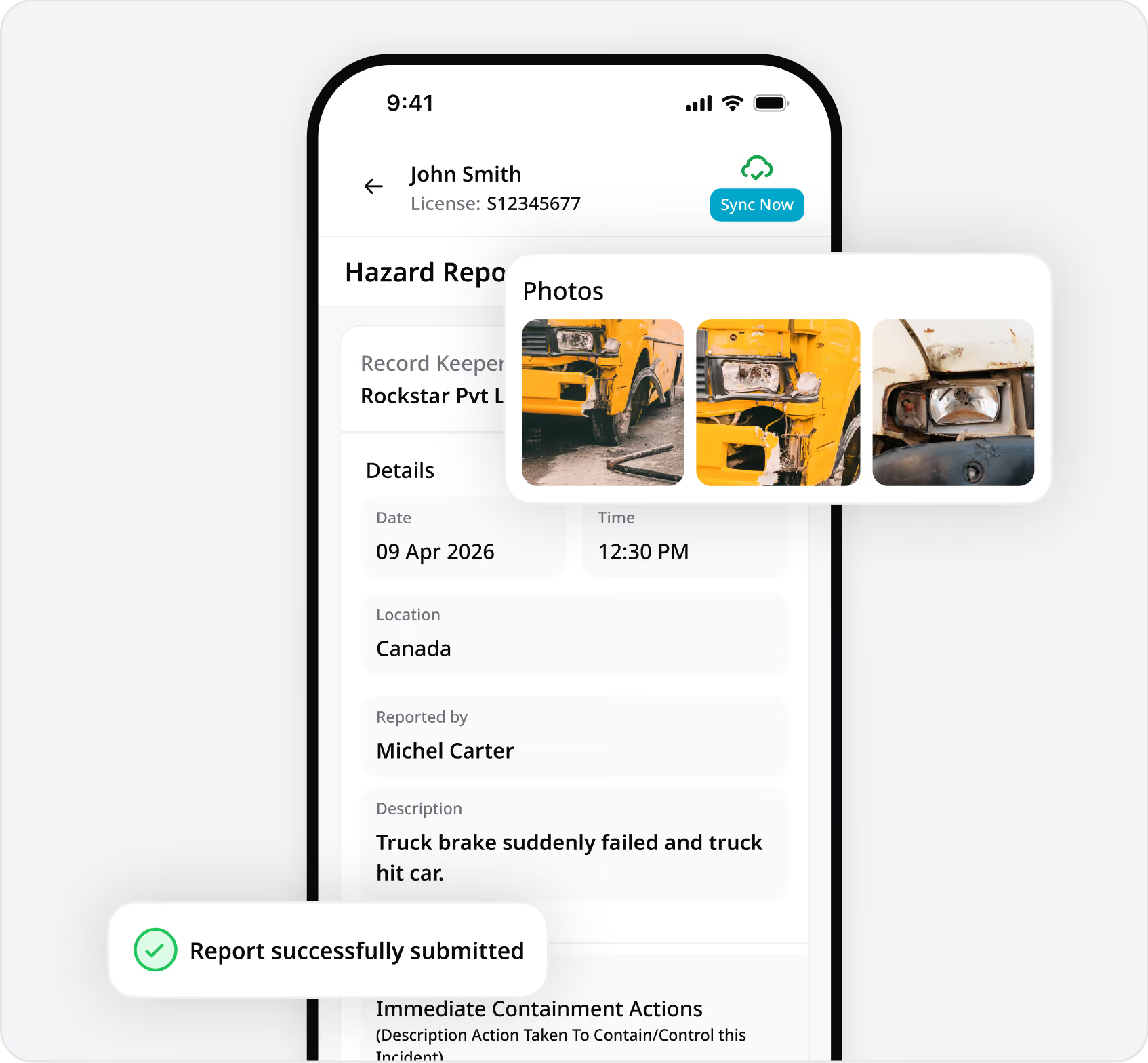
Drivers and staff report hazards directly from the Hubfleet mobile app — on the spot, while the observation is fresh.
What's captured:
  • Photos — Document the hazard with one or more photos for context and evidence
  • GPS location — Automatically tagged so managers know exactly where the hazard exists
  • Safety category — Fatigue, Maintenance, Mass & Dimension, or Safety
  • Description — What was observed, what the risk is, and any immediate action take
Takes under 2 minutes.
No paper forms, no waiting until end of shift, no relying on memory. Reports sync instantly to the web portal for manager triage.
Works offline
Drivers in remote areas can submit reports without connectivity. Data syncs automatically when connection is restored.
Assess the Risk

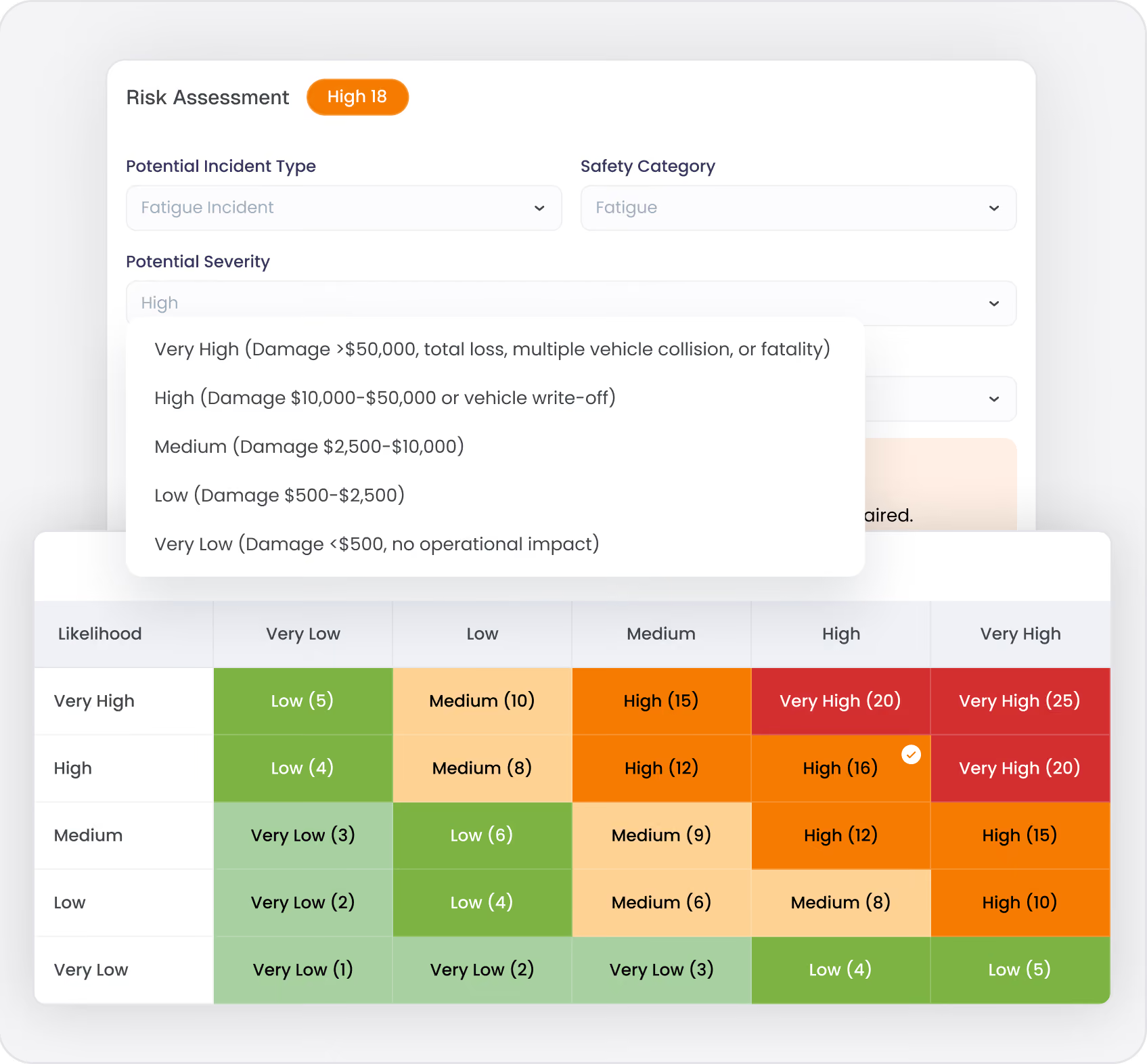
Once a hazard is reported, managers assess it using Hubfleet's 5×5 risk matrix — the same consistent framework used across all safety events (incidents, NCRs, vehicle faults).
Likelihood (1–5) × Severity (1–5) = Risk Score (1–25)
Risk scores map to five consistent categories:
  • Very Low (1–3) — Monitor, no immediate action
  • Low (4–6) — Routine controls adequate
  • Medium (7–12) — Enhanced controls or supervisor action required
  • High (13–19) — Immediate management attention, escalation triggered
  • Very High (20–25) — Urgent response, operations may need to stop
Automated escalation:
High and Very High hazards automatically notify safety category owners and escalation contacts. No relying on someone remembering to flag it.
Drivers in remote areas can submit reports without connectivity. Data syncs automatically when connection is restored.
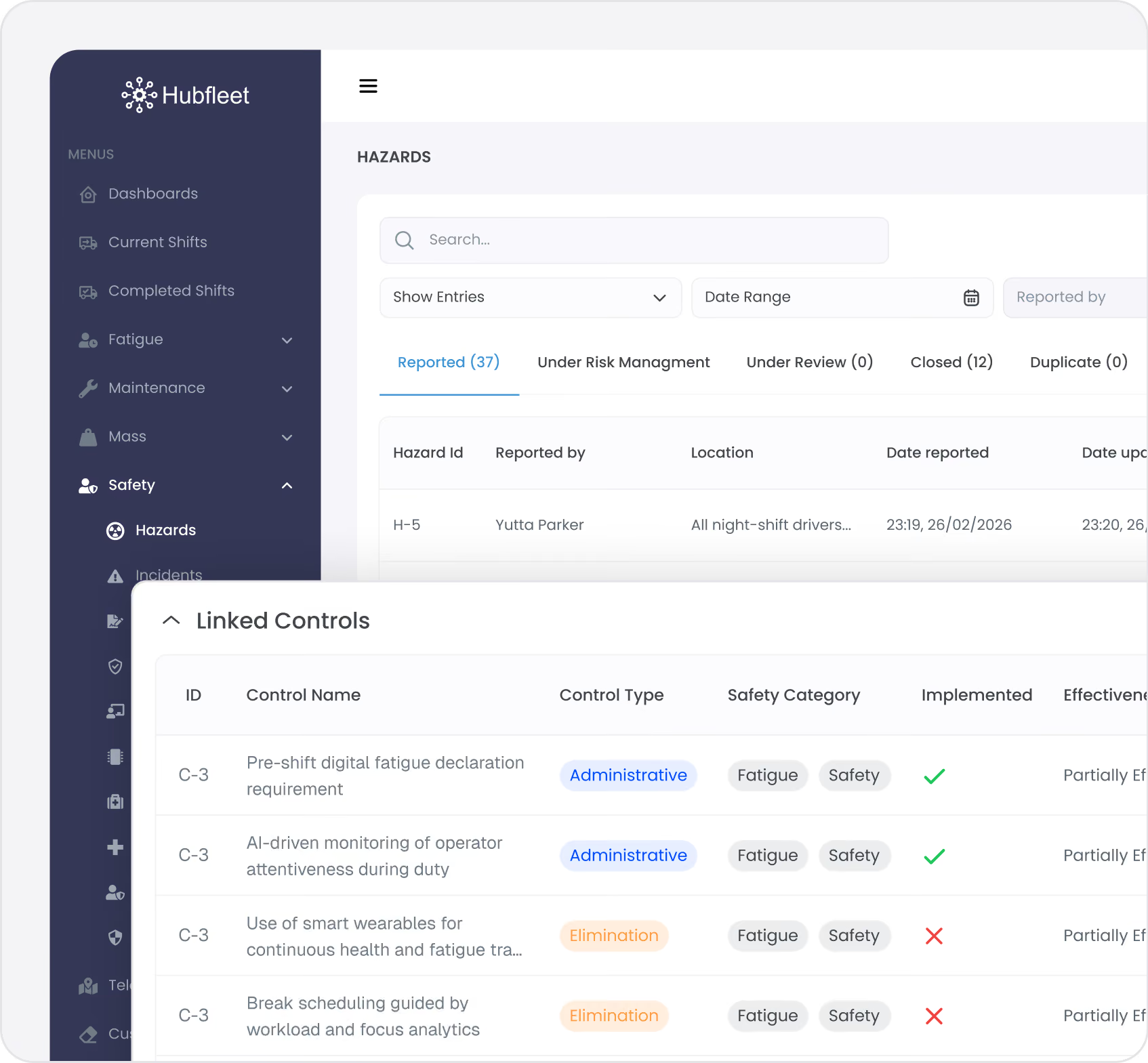
Assign Corrective Actions

Every hazard flows through a structured workflow until it's resolved:
Reported → Assessed → Controls Assigned → Closed
Link to Risk Controls:
Search the Risk Controls Library and link relevant controls to the hazard. If no existing control covers this risk, create a new one. This builds your reactive evidence chain — real-world hazards linked to the controls designed to manage them.
Assign Corrective Actions:
  • Specific actions assigned to named owners
  • Due dates and priority levels
  • Assignees notified and track completion
  • Evidence of closure (photos, notes, verification)
  • Qualification details
Close with Evidence:
Hazards can only be closed when actions are completed and the risk has been addressed. Complete history of who reported, who assessed, what actions were taken, and when it was resolved.
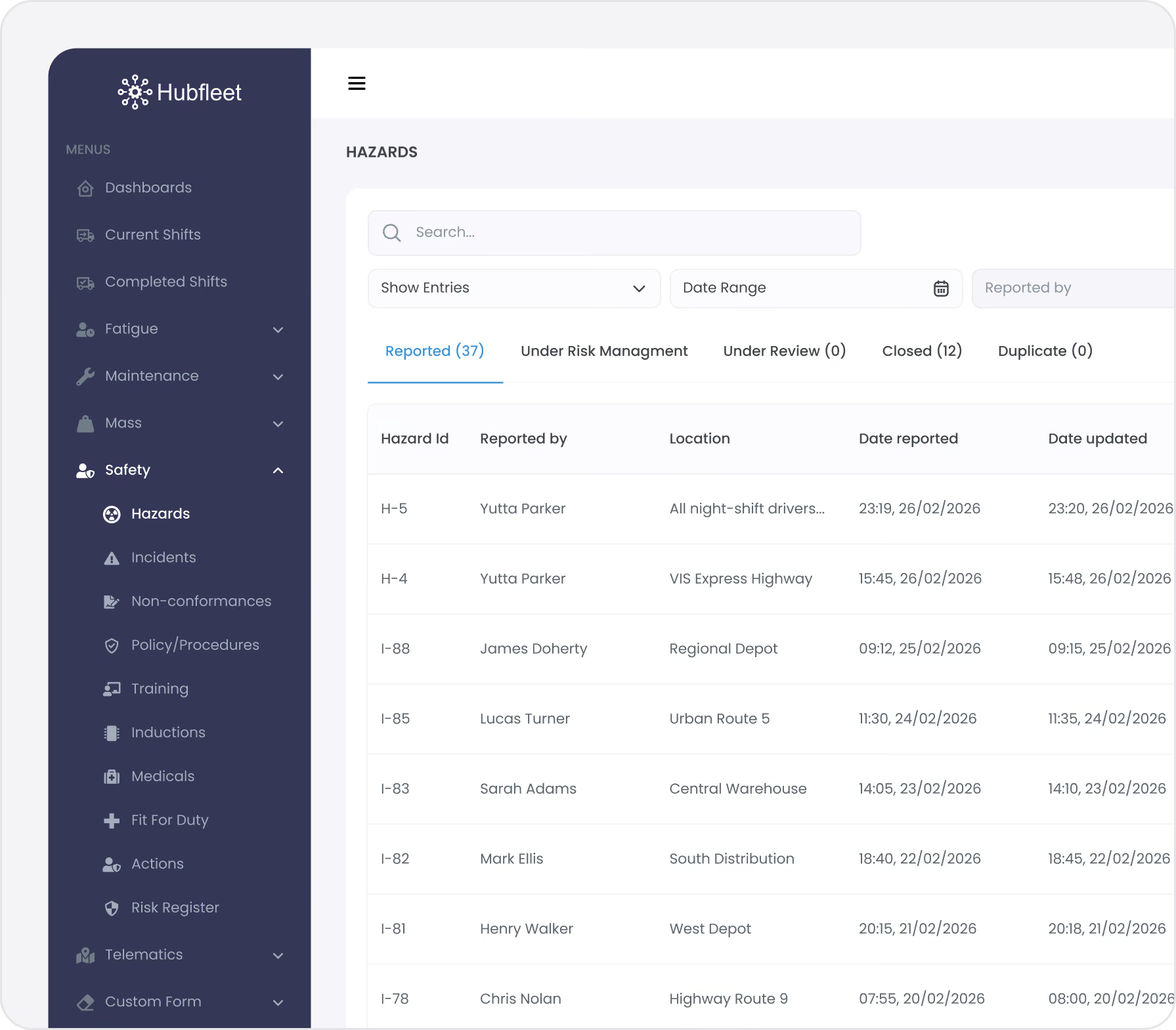
Nothing falls through the cracks. Open hazards are visible on the dashboard. Overdue actions trigger reminders. Management has full visibility of resolution progress.

Unified Risk Register

What to look for:
  • Recurring incident types — Same category of events happening repeatedly signals ineffective controls
  • Route/location patterns — Multiple incidents at the same location or on the same route
  • Time-of-day patterns — Incidents clustering around night shifts, early starts, or end of long shifts
  • Driver group patterns — New drivers, specific depots, or particular roster patterns
  • Control failure patterns — The same control linked to multiple incidents means it's not working
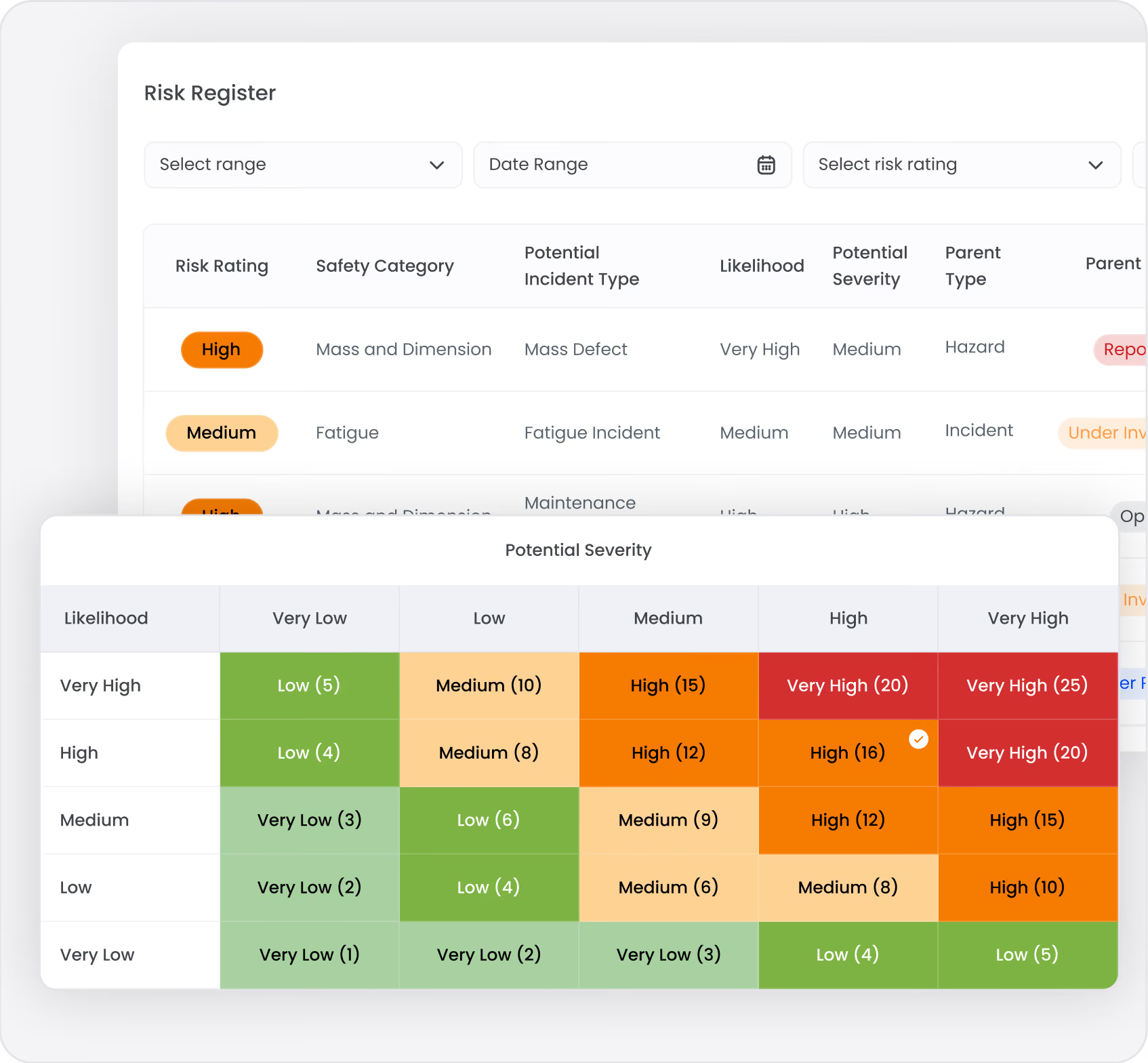
Every risk-assessed hazard feeds into Hubfleet's unified risk register alongside incidents, NCRs, and vehicle faults. One view of all organisational risks — filterable by risk level, safety category, date, or status.
This means management can see all High and Very High risks in one place, regardless of whether they came from a hazard report, an incident, or a vehicle fault. That's the systematic, risk-based approach HVNL reforms auditors expect.
See Risk Management for the full unified risk register and how all safety events connect.

Building a Proactive Safety Culture

In most transport operations, incidents are reported on paper forms — if they're reported at all. The form goes into a filing cabinet. Maybe someone has a conversation about what happened. Rarely is there a formal investigation. Almost never is there a documented corrective action. And the same incidents keep recurring because lessons aren't captured, tracked, or acted on.
What to look for:
  • Make it easy — Mobile reporting in under 2 minutes removes friction
  • Close the loop — When a driver reports a hazard and sees it actioned, they report again. When reports disappear into a void, they stop reporting
  • Recognise reporters — Acknowledge hazard reports positively. Reporting is a safety contribution, not a complaint
  • Track reporting rates — Monitor hazard reports per driver/per month. Low rates may indicate barriers, not absence of hazards
  • Share outcomes — Communicate what was done about reported hazards. "A driver reported X on Route Y — we've implemented Z control" builds confidence in the system
The difference between reactive and proactive SMS:
  • Reactive: You only know about risks after an incident occurs. Your safety data is a history of failures.
  • Proactive: You identify risks before incidents through hazard reporting, near-miss capture, and systematic risk assessment. Your safety data shows you're actively seeking and controlling risks.
HVNL reforms auditors will specifically look for evidence of proactive hazard identification. A healthy hazard reporting rate — with hazards outnumbering incidents — is one of the strongest signals that your SMS is operating effectively.

HVNL reforms SMS Compliance

Outcome Area 2: Risk Management
Hazard reporting directly addresses the proactive hazard identification requirement of SMS Outcome Area 2. HVNL Reform Compliance Guide requires operators to have systematic processes to identify hazards before they cause harm — not just investigate after incidents.
PSOE Audit Evidence
Icon of a document with a shield symbol in front, representing document security or protection.
Present
Hazard reporting system configured with categories, workflows, and escalation rules
Blue gear icon with a shield symbol indicating security or protection.
Suitable
 Mobile reporting accessible to all field staff; risk assessment matched to operations
Two overlapping gear icons, one large blue gear behind a smaller black gear.
Operating
Active hazard reports with dates, photos, GPS, assessments, and linked controls
Arrow hitting the bullseye of a blue target.
Effective
Hazard reporting rates trending up (culture improving), hazard types informing control improvements, declining incident rates in areas with active hazard reporting
See PSOE Evidence Framework Guide: Demonstrating SMS Compliance Under HVNL reforms for detailed guidance on building audit-ready evidence across all outcome areas.
Get Started in Days, Not Months
Free guides, tools, and frameworks to start preparing for HVNL today — built by Australian compliance specialists and trusted by 500+ fleets.
Blue binder or folder with three horizontal black lines on the front cover.
HVNL Compliance Guide
What HVNL means for your fleet — explained in plain English
  • All 5 SMS outcome areas explained
  • Implementation timeline & milestones
  • Fleet preparation checklist
  • Gap assessment framework
  • Change summary from current HVNL
Read the Guide
HVNL Compliance Toolkit
Free downloadable templates to start preparing today.
  • Gap analysis template (5 outcome areas)
  • Pre-audit readiness checklist
  • SMS implementation tracker
  • PSOE evidence mapping
  • Implementation timeline template
Get the Free Toolkit
Audit Preparation Guide
The questions NHVR auditors ask — and where to find your answers.
  • Common auditor questions by outcome area
  • Direct answers showing where evidence sits in Hubfleet
  • PSOE framework explained
  • Audit-day preparation checklist
  • Real auditor scenarios
Read the Audit Guide

Identify Risks Before They Cause Harm

Mobile field reporting
Photos, GPS, and categorisation in under 2 minutes
5×5 risk assessment
Consistent scoring with automated escalation
Controls linking
Connect hazards to your Risk Controls Library
Structured workflow
Every certificate, every assessment, one system
Unified risk register
Every hazard alongside incidents, NCRs, and faults
Proactive PSOE evidence
Prove your SMS identifies risks before they materialise

Stop waiting for incidents to tell you where the risks are.

Stylized blue paper airplane icon with shadow on transparent background.
Start Free Trial
Recommended for most fleets
Best if you're ready to get drivers logging now and explore Hubfleet at your own pace.
Icon
Full platform access — every feature, no limits
Icon
Drivers can start on EWD today
Icon
Real EWD, SMS, and compliance reporting from day one
Icon
No upfront costs · No lock-in contract
Start Free Trial
Icon of a calendar with blue top binder and dark gray date display area.
Book your Demo
Best for larger fleets or complex setups
Best if you've got specific integration questions, multiple sites, or want a tailored walkthrough first.
Icon
Tailored to your fleet and use case
Icon
30 minutes with a Hubfleet specialist
Icon
See the platform mapped against your fleet's compliance obligations
Icon
Get HVNL and SMS questions answered live
Book your 30-Minute Demo
Want to see plans first?
Icon
500+ Australian operators
Icon
NHVR approved
Icon
Free trial
Icon
Australian-based support