
Home
Solutions

Risk Controls

Build, Link, and Prove Your Safety Controls

Risk controls are the backbone of your Safety Management System. Hubfleet's Risk Controls Library lets you create controls — using our built-in controls library as a starting guide — then link them to the policies, procedures, and training that support them — and then connect real-world incidents, hazards, and NCRs to prove whether those controls are actually working.

Preventive Linking | Reactive Evidence | Effectiveness Tracking | Audit-Ready

Icon
Create controls using built-in templates as guides
Icon
Link preventive and reactive items
Icon
Prove control effectiveness at audit

Why Operators Choose Hubfleet for Risk Controls

Icon
Full traceability from policy through to real-world outcomes
Icon
Preventive links to policies, procedures, training, and planned hazards
Icon
Reactive links to incidents, field hazards, and NCRs
Icon
Effectiveness evidence that proves controls are working
Icon
The missing link between your safety documentation and real-world outcomes

The Problem: Controls Exist on Paper but Can't Be Proven

Most operators have safety controls documented somewhere — but they can't demonstrate those controls are implemented, monitored, or effective.
Auditors under HVNL reforms don't just ask "Do you have controls?" They ask "Are your controls Present, Suitable, Operating, and Effective?" That last word — Effective — is the hardest to prove. It requires evidence that controls are actually preventing the risks they were designed for.
Without a Controls Library
Icon
Controls scattered across Word docs, spreadsheets, and safety plans
Icon
No connection between a control and the policy that mandates it
Icon
No way to see if a control has ever been tested by a real incident
Icon
Auditors ask for evidence and you're piecing it together manually
Icon
Same incidents keep recurring because nobody tracks if controls failed
With Hubfleet's Controls Library
Icon
Every control in one searchable, categorised library
Icon
Preventive links show how controls are supported
Icon
Reactive links show whether controls are working
Icon
Complete traceability from policy through to real-world evidence
Icon
Control failures are visible and drive improvement
Create and Manage Controls

Your Central Controls Register

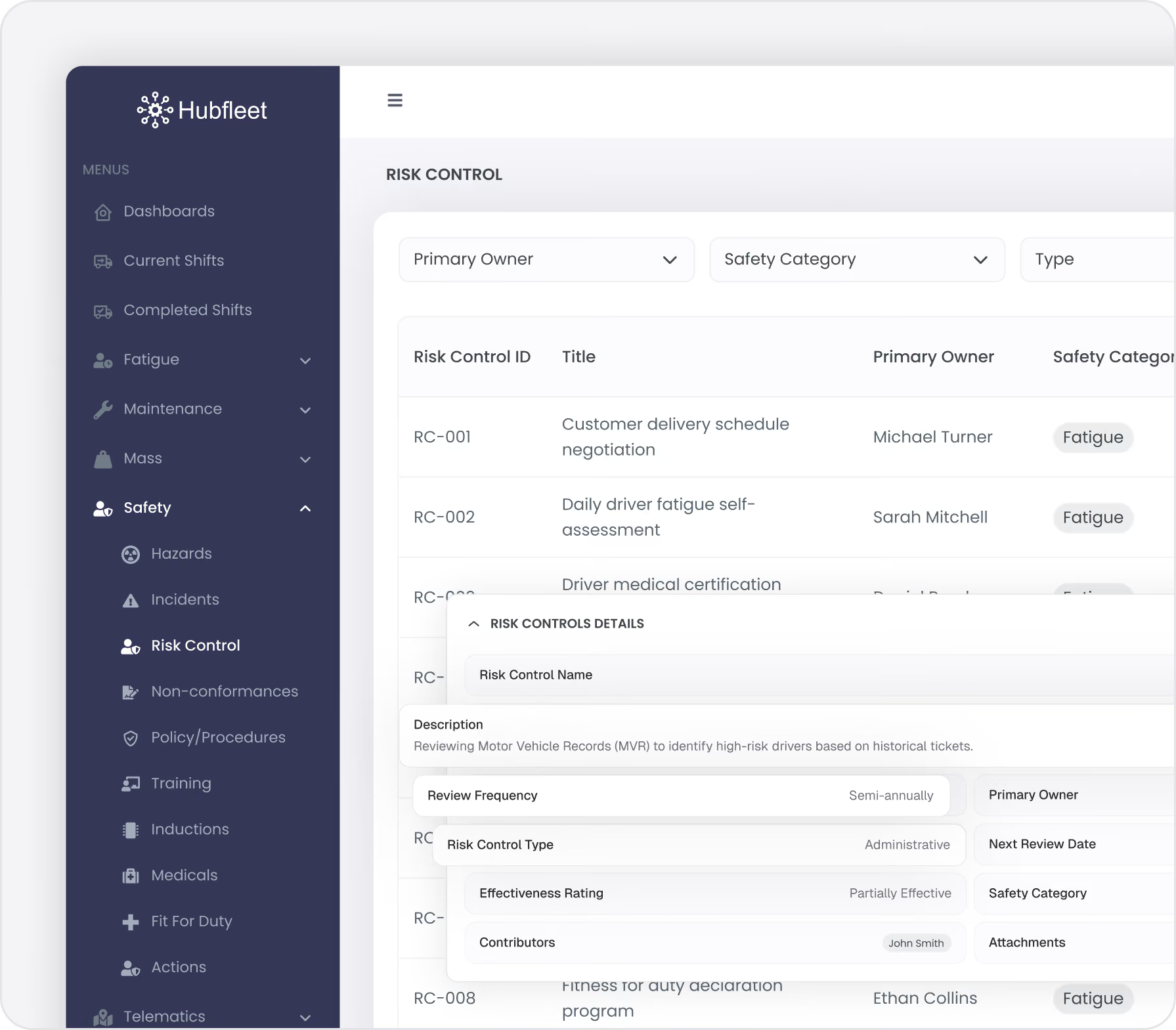
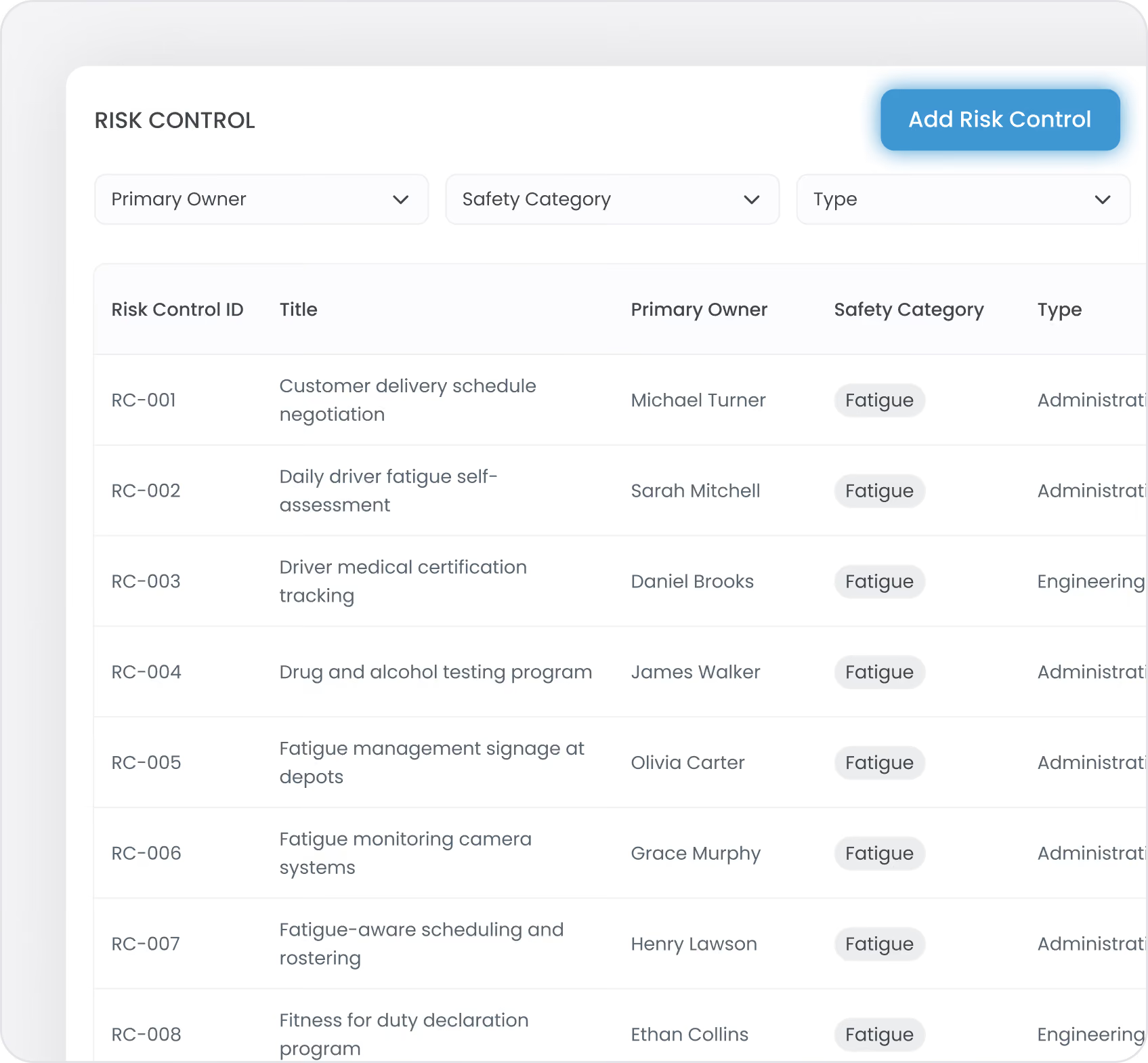
Create controls from scratch or use our built-in controls library as a starting guide — each control is stored in a single, searchable library. Each control is categorised and structured for easy retrieval and linking.
For Each Control, You Can Define:
  • Control name and description
  • Safety category (Fatigue, Maintenance, Mass & Dimension, Safety)
  • Control type based on the hierarchy of controls (Elimination, Substitution, Engineering, Administrative, PPE)
  • Control status — Draft, Active, or Archived
  • Review frequency — Quarterly, Semi-annually, or Annually
  • Effectiveness rating — updated over time based on linked evidence
Organised and Searchable:
Filter by safety category, control type, or implementation status. Find the right control quickly when assessing a new hazard or investigating an incident.
Preventive Linking: How Controls Are Supported

Link the Things That Make Controls Work

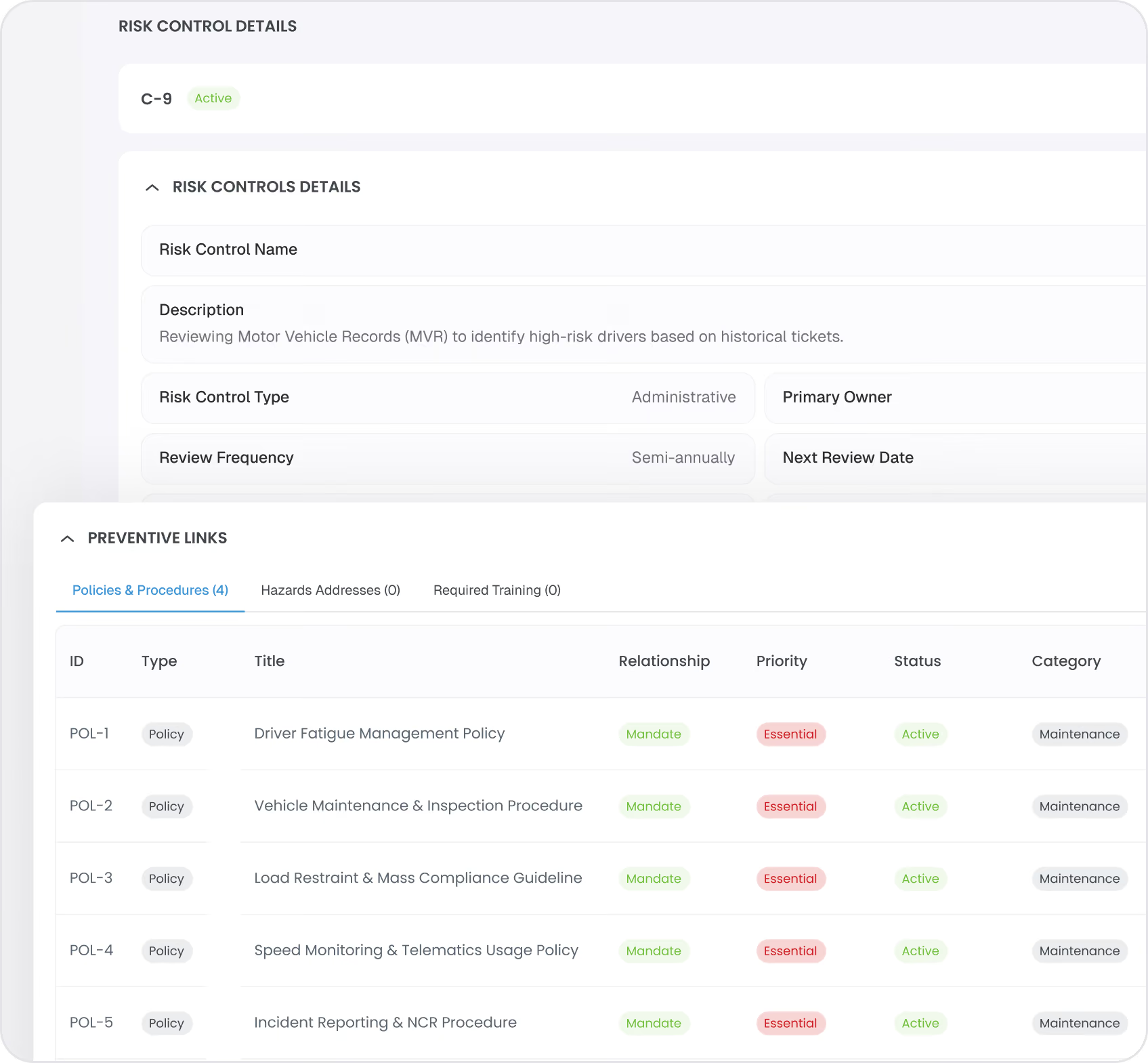
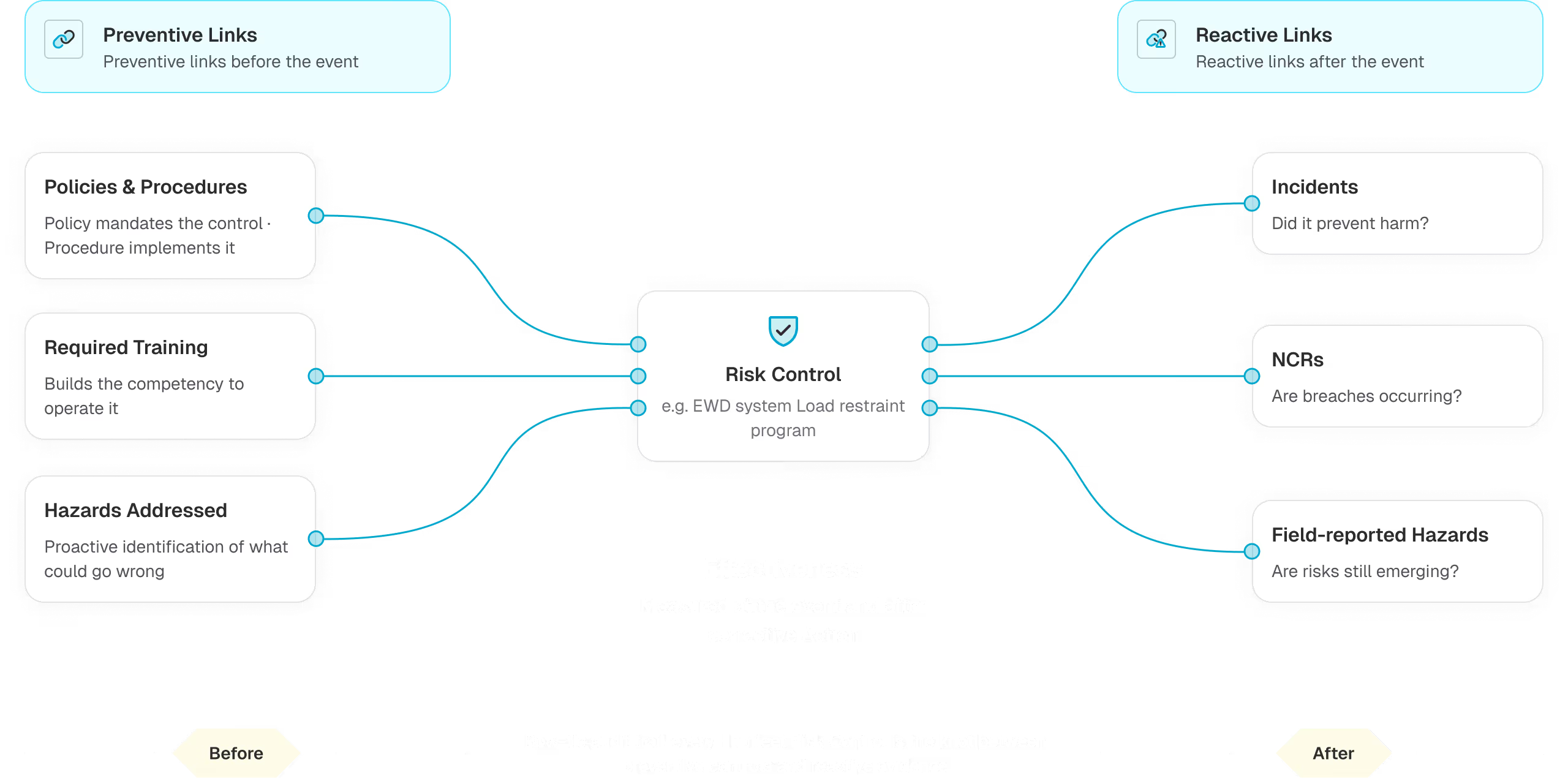
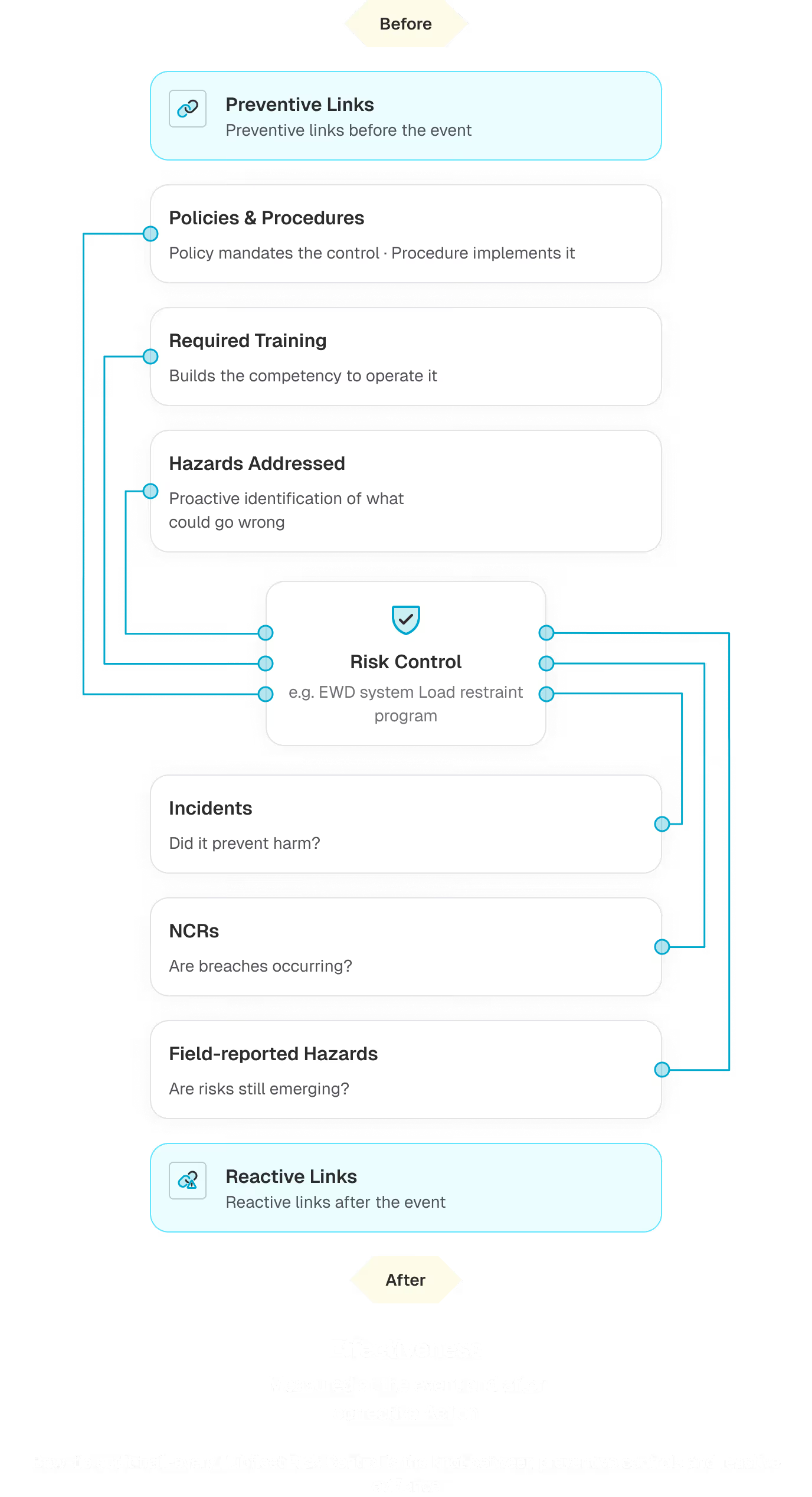
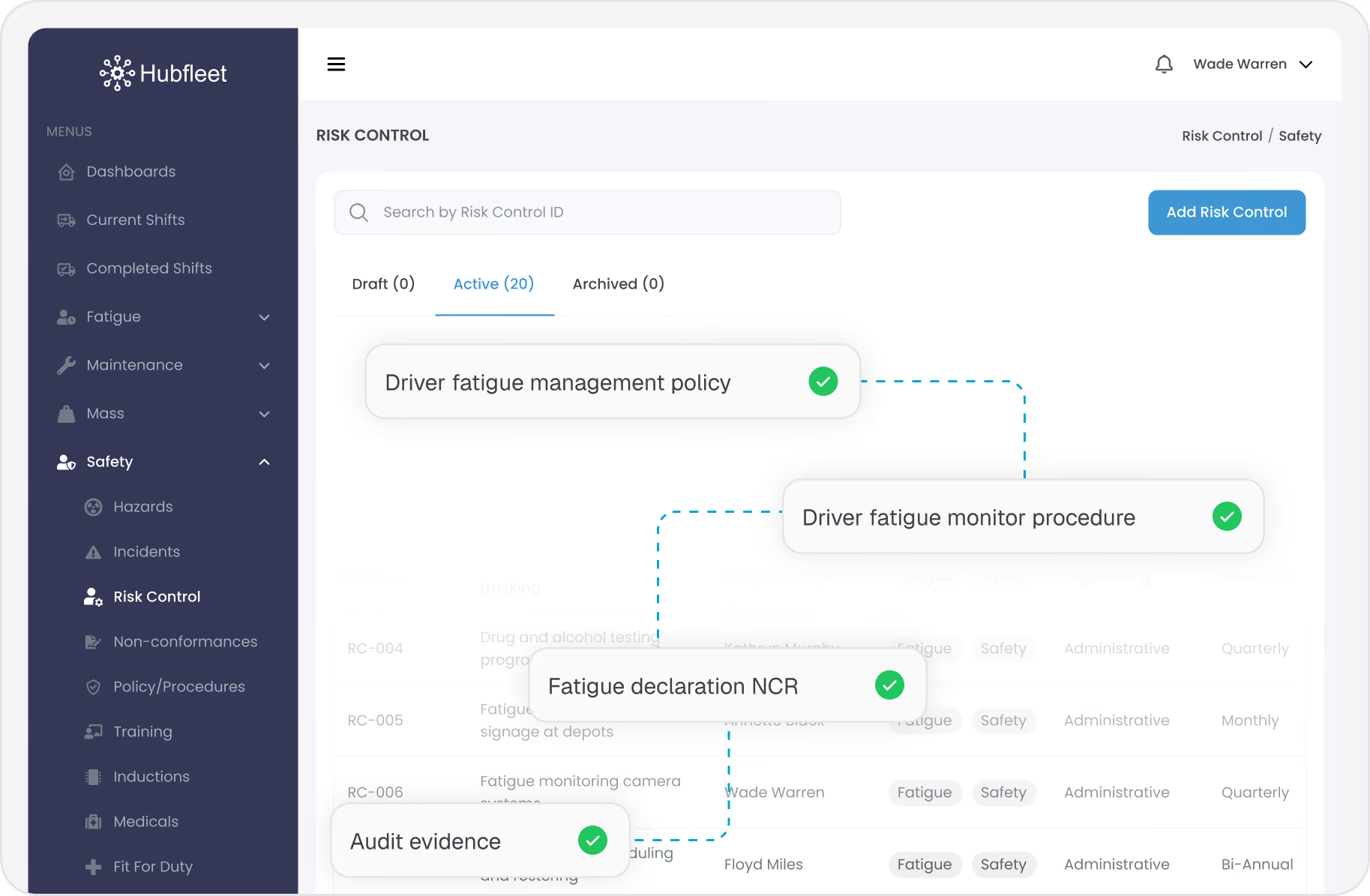
Preventive links connect a control to the items that mandate, implement, and support it. This is the planning side of your SMS — the proactive measures you've put in place before anything goes wrong.
Policies
Blue refresh icon with two circular arrows forming a loop.
Mandate the Control
Link the policy that requires this control to exist. For example, your Fatigue Management Policy mandates a "Pre-shift fitness for duty assessment" control. This shows auditors that controls aren't ad-hoc — they're driven by documented policy.
Procedures
Blue refresh icon with two circular arrows forming a loop.
Implement the Control
Link the procedure that describes how to carry out the control. The fitness for duty assessment control links to the "Driver Fitness for Duty Procedure" that describes what questions are asked and what happens if a driver reports unfit. This proves the control isn't just a name on paper — there's a documented process behind it.
Training Types
Blue refresh icon with two circular arrows forming a loop.
Build Competency
Link the training required to carry out the control effectively. Drivers need fatigue awareness training to properly self-assess fitness for duty. Supervisors need training on reviewing and responding to unfit declarations. This connects controls to your competency framework.
Planned Hazards
Blue refresh icon with two circular arrows forming a loop.
Identified in Risk Planning
Link hazards that were identified proactively during risk planning — before any incident occurred. This shows auditors you identified the risk, designed a control for it, and supported it with policy, procedure, and training.
Reactive Linking: Evidence That Controls Are Working (or Not)

Connect Real-World Events to Your Controls

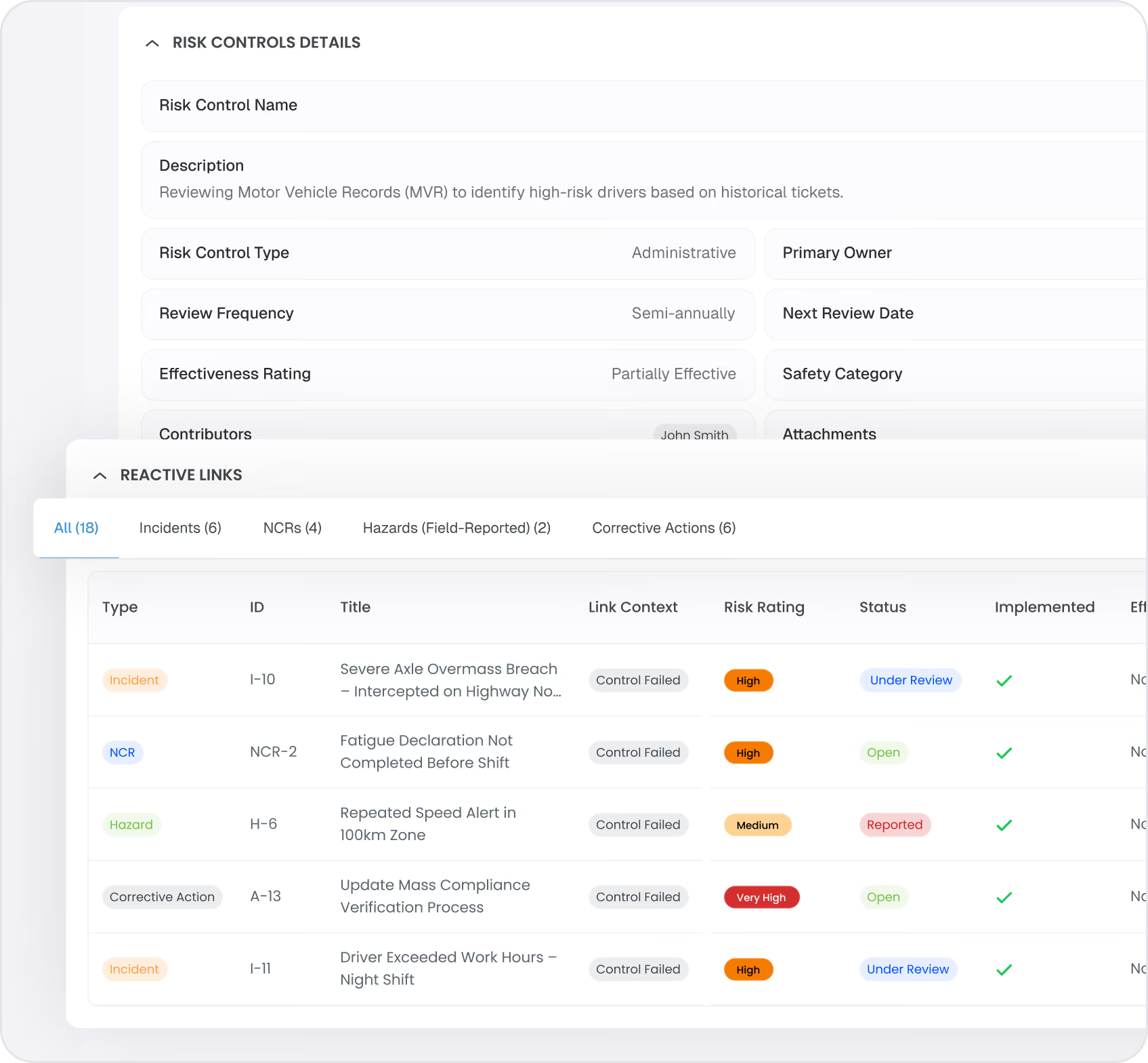
Reactive links connect real-world safety events back to the controls that were supposed to prevent them. This is the evidence side of your SMS — the proof that your preventive measures are actually working.
Incidents → Did the Control Prevent Harm?
When an incident occurs, link it to the relevant control. If the control was in place and the incident still happened, that's evidence the control may need strengthening. If incidents in a category are decreasing over time, that's evidence the control is effective.
Field-Reported Hazards
Blue refresh icon with two circular arrows forming a loop.
Reactive Hazards
When drivers or staff report hazards from the field, link them to relevant controls. A pattern of reported hazards in a controlled area suggests the control may not be fully effective. Decreasing hazard reports in that area over time suggests it is.
Non-Conformance Reports (NCRs)
Blue refresh icon with two circular arrows forming a loop.
Breaches Despite Controls
NCRs represent breaches of regulations, policies, or procedures. Linking NCRs to controls shows where compliance failures are occurring despite preventive measures. This drives targeted improvement.
The Context That Proves Effectiveness:
Reactive links give you the evidence to assess whether a control is working. A control with strong preventive links (policy, procedure, training) and a low or declining count of reactive links (incidents, hazards, NCRs) tells a clear story. You review the linked events, assess the pattern, and update the effectiveness rating accordingly. That's exactly the kind of evidence-based judgement NHVR auditors want to see.
The Complete Evidence Chain

From Policy to Proof — In One View

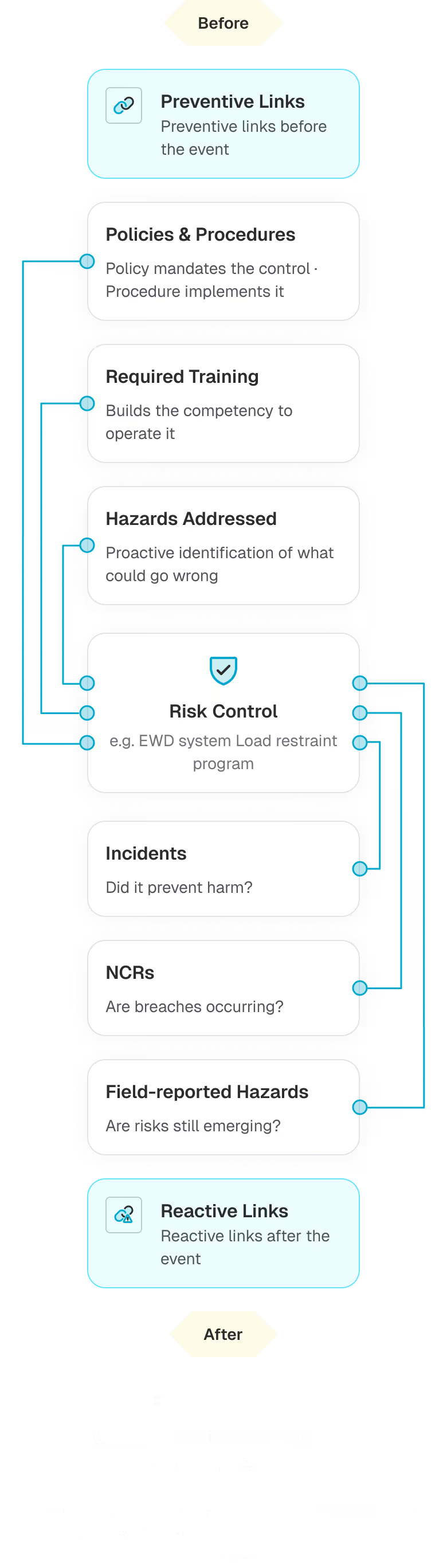
The power of Hubfleet's controls library is the complete traceability it creates:
Policy (mandates the control)
Right-pointing arrow icon.
Control (the measure itself)
Right-pointing arrow icon.
Procedure (implements it)
Right-pointing arrow icon.
Training (builds competency)
Right-pointing arrow icon.
Planned Hazards (proactive identification)
Blue refresh icon with two circular arrows forming a loop.
Incidents (did it prevent harm?)
Leftward pointing arrow icon.
Field Hazards (are risks still emerging?)
Leftward pointing arrow icon.
NCRs (are breaches occurring?)
This two-way chain connects your documentation to real-world outcomes. Auditors can follow the thread from any direction — start at a policy and trace down to incidents, or start at an incident and trace back up to the policy that should have prevented it.
PSOE Audit Evidence

Proving "Effective" — The Hardest PSOE Rating

Under HVNL reforms, NHVR auditors assess your SMS using the PSOE framework: Present, Suitable, Operating, Effective. Most operators can show the first three. The controls library helps you prove all four:
Present
Controls are documented in the library with descriptions, categories, and types. Evidence: the controls library itself.
Suitable
Controls are linked to relevant policies and procedures, matched to identified hazards, and appropriate for your operations. Evidence: preventive links.
Operating
Controls have active implementation status, are linked to real incidents and hazards, and have scheduled reviews completed. Evidence: reactive links and review history.
Effective
Reactive link counts show how many incidents, hazards, and NCRs are connected to each control — giving you the context to assess whether controls are working. Update effectiveness ratings based on what the evidence tells you. Evidence: reactive link counts and manual effectiveness ratings informed by real data.
This is the evidence chain that most SMS platforms can't provide. Spreadsheets and standalone incident systems can't connect controls to policies and to real-world outcomes in a single view. See how this fits into your broader fleet operations on our For Fleet Managers page.

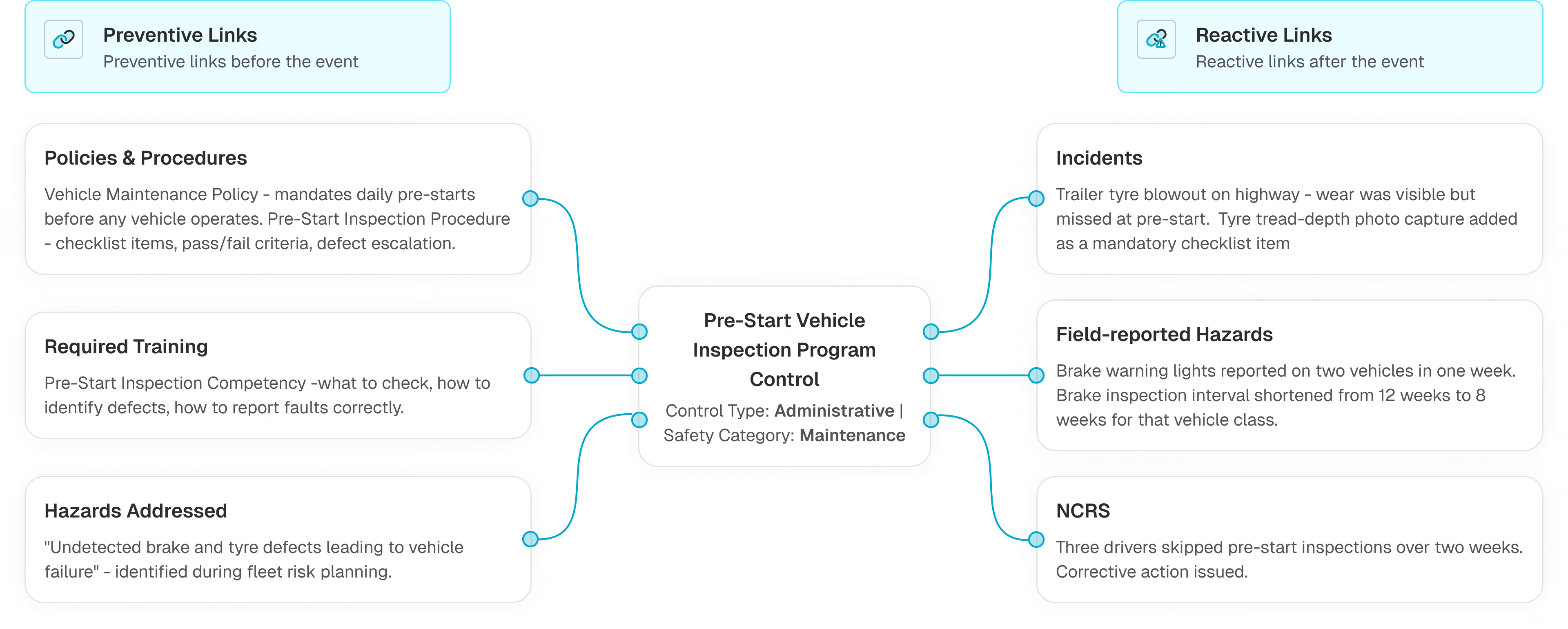
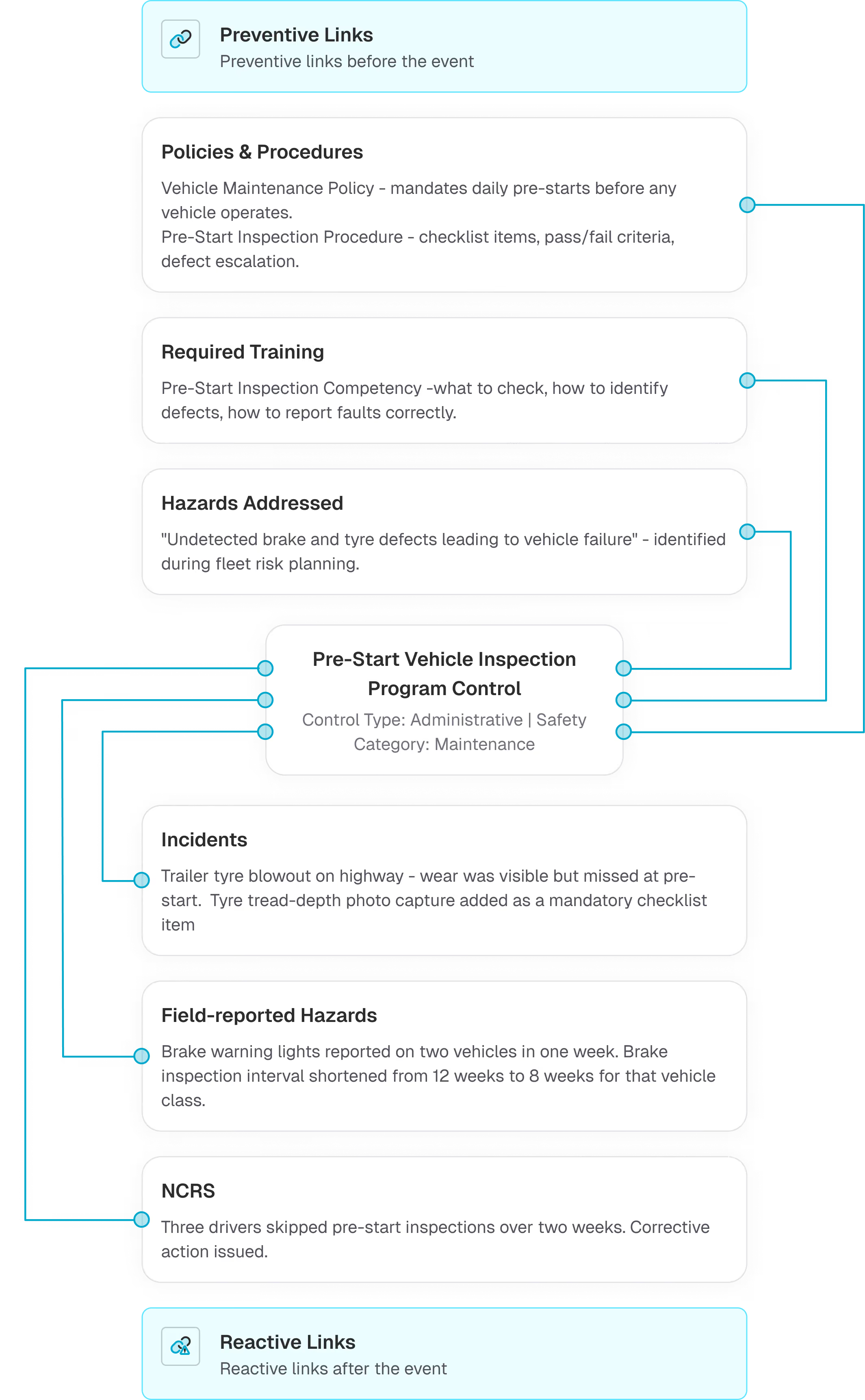
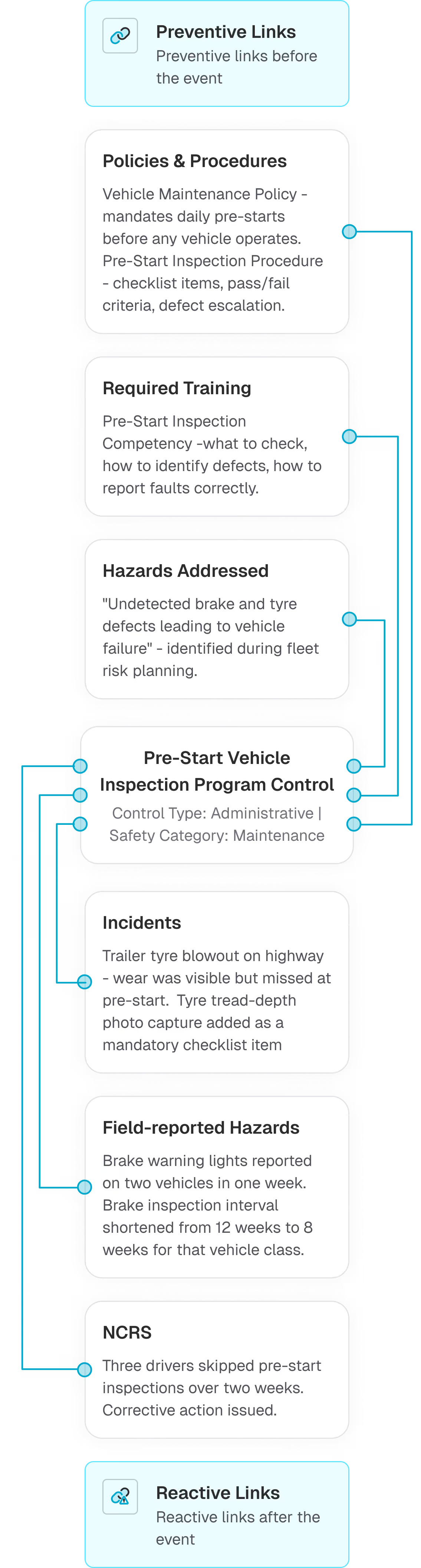
Example: "Pre-Start Vehicle Inspection Program" Control

Control Type: Administrative | Safety Category: Maintenance
Effectiveness Rating:
Updated based on the linked-event evidence trail above - 2 incidents in 6 months (down from 5), 1 NCR closed with no recurrence, 1 field hazard that drove a maintenance interval change

Integration with Risk Management

The controls library doesn't stand alone — it's a core component of Hubfleet's broader Risk Management system.
  • Risk Register: Controls linked to risk assessments appear in the unified risk register, showing which risks have active controls and which don't
  • Hazard Workflow: When a new hazard is identified, search the controls library and link relevant controls — or create a new one if no control exists
  • Incident Investigation: During investigation, identify which controls were in place and whether they failed — linking the incident to the control for effectiveness tracking
  • NCR Workflow: Link NCRs to the controls that should have prevented the breach — driving corrective action and control improvement
  • Corrective Actions: When a control is found to be ineffective, corrective actions are created and tracked through to closure
Related Features:
Risk Management system.
Unified risk register, risk assessment, and hazard management
Non-Conformance Reporting (NCR)
Track compliance breaches and link to controls
Fit for Duty
Driver fitness checks as an administrative control
Safety Management System
Complete SMS platform covering all 5 outcome areas
Get Started in Days, Not Months
Free guides, tools, and frameworks to start preparing for HVNL today — built by Australian compliance specialists and trusted by 500+ fleets.
Blue binder or folder with three horizontal black lines on the front cover.
HVNL Compliance Guide
What HVNL means for your fleet — explained in plain English
  • All 5 SMS outcome areas explained
  • Implementation timeline & milestones
  • Fleet preparation checklist
  • Gap assessment framework
  • Change summary from current HVNL
Read the Guide
HVNL Compliance Toolkit
Free downloadable templates to start preparing today.
  • Gap analysis template (5 outcome areas)
  • Pre-audit readiness checklist
  • SMS implementation tracker
  • PSOE evidence mapping
  • Implementation timeline template
Get the Free Toolkit
Audit Preparation Guide
The questions NHVR auditors ask — and where to find your answers.
  • Common auditor questions by outcome area
  • Direct answers showing where evidence sits in Hubfleet
  • PSOE framework explained
  • Audit-day preparation checklist
  • Real auditor scenarios
Read the Audit Guide

Prove Your Controls Are Working —Not Just Documented

Blue folder icon with black outline on white background.
Centralised controls library
Create and organise all safety controls in one place, with built-in templates to guide you
Blue chain link icon symbolizing a connection or link.
Preventive linking
Connect controls to policies, procedures, training, and planned hazards
Teal-colored broken link icon with a warning triangle.
Reactive linking
Connect incidents, field hazards, and NCRs to provide effectiveness evidence
Blue paperclip icon tilted to the right on a white background.
Complete evidence chain
Policy → Control → Procedure → Training → Real-world outcomes
Blue document icon with a magnifying glass symbolizing audit readiness.
PSOE "Effective" evidence
Reactive link counts and manual ratings give you the audit-ready proof most operators can't provide
Blue price tag icon with a dollar sign on it.
Simple pricing
Included in Safety Management add-on at $6/driver/month

Ready to prove your controls are working?

Stylized blue paper airplane icon with shadow on transparent background.
Start Free Trial
Recommended for most fleets
Best if you're ready to get drivers logging now and explore Hubfleet at your own pace.
Icon
Full platform access — every feature, no limits
Icon
Drivers can start on EWD today
Icon
Real EWD, SMS, and compliance reporting from day one
Icon
No upfront costs · No lock-in contract
Start Free Trial
Icon of a calendar with blue top binder and dark gray date display area.
Book your Demo
Best for larger fleets or complex setups
Best if you've got specific integration questions, multiple sites, or want a tailored walkthrough first.
Icon
Tailored to your fleet and use case
Icon
30 minutes with a Hubfleet specialist
Icon
See the platform mapped against your fleet's compliance obligations
Icon
Get HVNL and SMS questions answered live
Book your 30-Minute Demo
Want to see plans first?
Icon
500+ Australian operators
Icon
NHVR approved
Icon
Free trial
Icon
Australian-based support