Home
Solutions

Incident Reporting & Investigation

From Event to Root Cause to Corrective Action

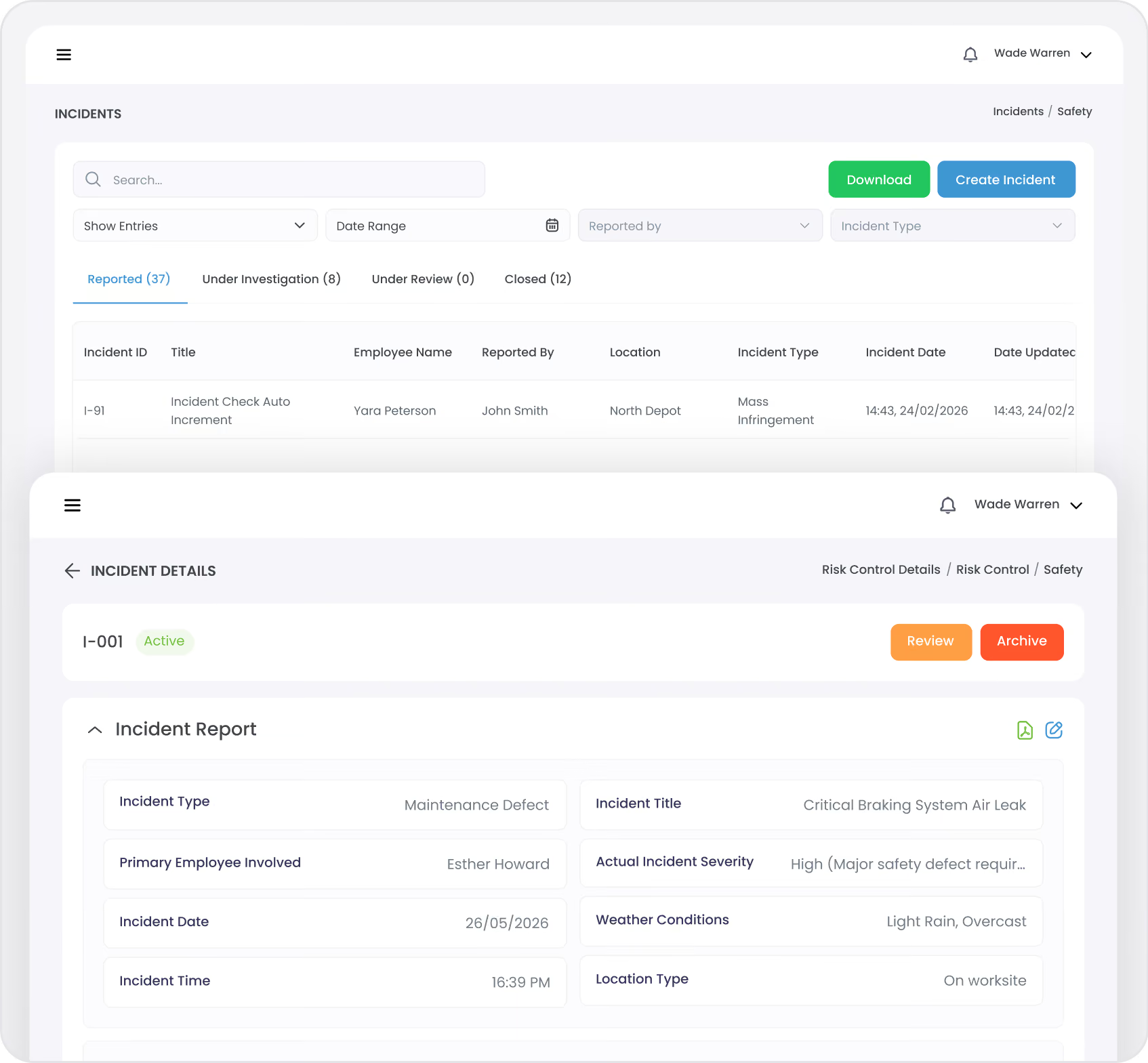
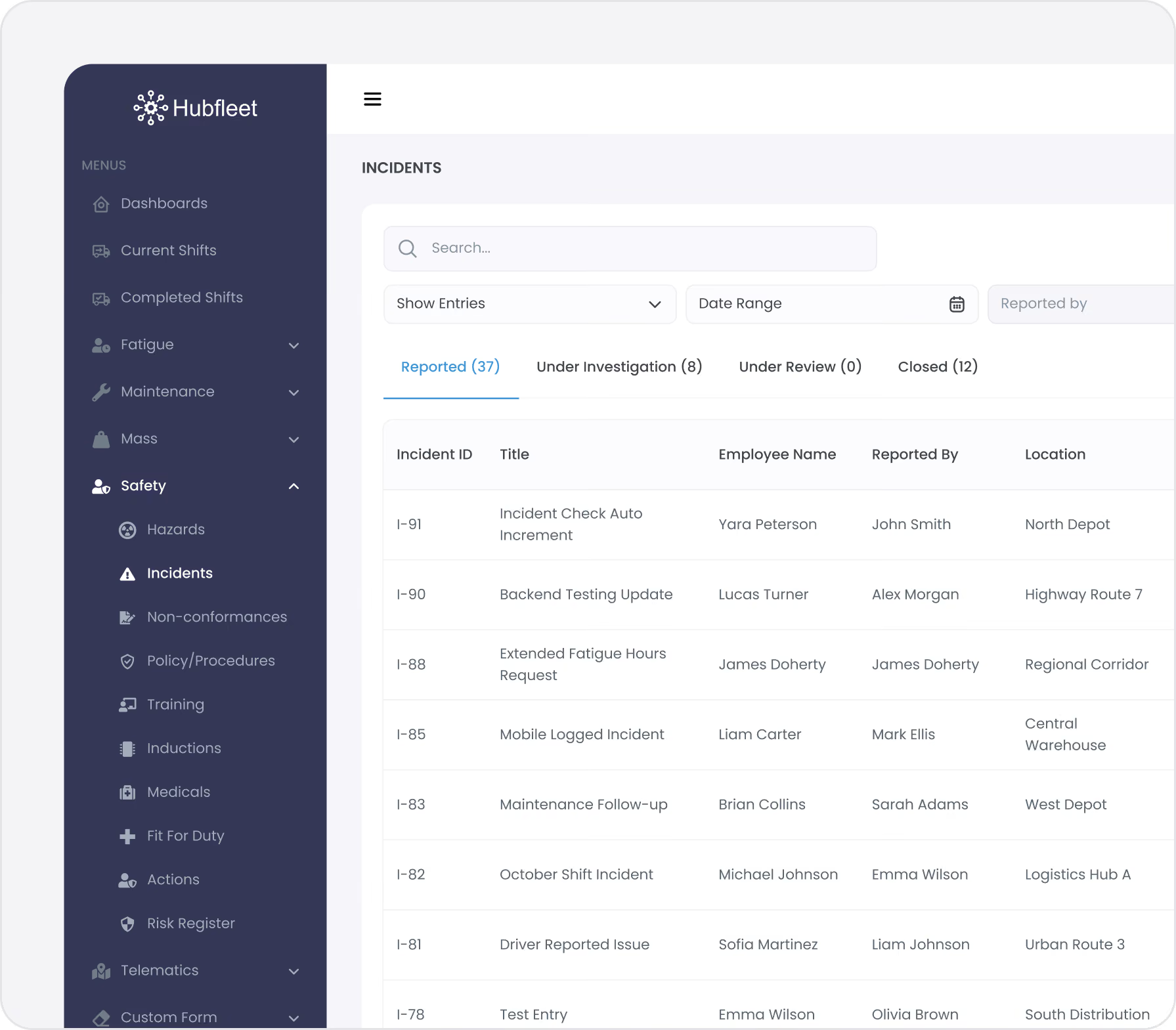
When a safety event occurs, every minute matters — for the people involved and for the evidence you'll need later. Hubfleet gives you a structured workflow to capture what happened, investigate why it happened, identify which controls failed, assign corrective actions, and track them through to closure. Every step creates audit-ready evidence of your response and continuous improvement.

Structured Workflow | Root Cause Analysis | Corrective Actions | Complete Audit Trail

Icon
Defined investigation stages with mandatory requirements
Icon
Full traceability from event through to corrective action closure

The Problem: Incidents Without Investigation

In most transport operations, incidents are reported on paper forms — if they're reported at all. The form goes into a filing cabinet. Maybe someone has a conversation about what happened. Rarely is there a formal investigation. Almost never is there a documented corrective action. And the same incidents keep recurring because lessons aren't captured, tracked, or acted on.

Common failures:
Red handwritten X mark on a white background.
Incidents reported verbally or on paper and never formally documented
Red handwritten X mark on a white background.
No structured investigation — just informal conversations
Red handwritten X mark on a white background.
Root causes never identified — the focus is on what happened, not why
Red handwritten X mark on a white background.
Corrective actions assigned verbally and never followed up
Red handwritten X mark on a white background.
No link between incidents and the controls that should have prevented them
Red handwritten X mark on a white background.
Same types of incidents recurring because nothing changes
Red handwritten X mark on a white background.
Auditors find gaps because there's no evidence of systematic response
Under HVNL reforms, SMS Outcome Area 4 (Assurance, Monitoring and Improvement) requires evidence that you investigate safety events, identify root causes, implement corrective actions, and verify they're effective. Paper forms and conversations can't prove any of that.

How It Works

Report the Incident

Western Australia operates outside NHVR jurisdiction with its own fatigue rules under Main Roads WA and WorkSafe WA regulations.
What's captured:
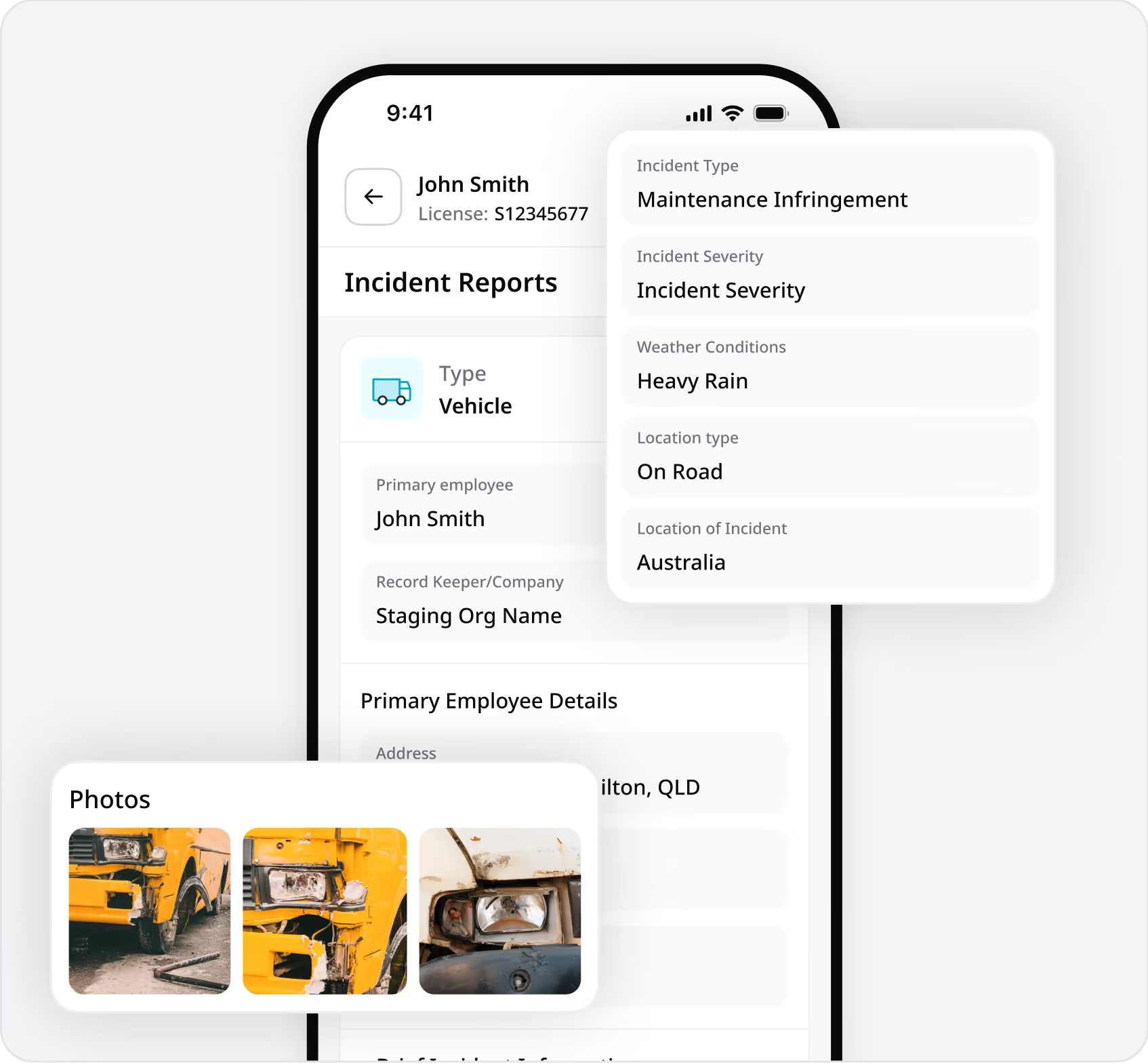
  • Incident type — Categorise the event (fatigue, vehicle, loading, workplace, environmental, near-miss)
  • Safety category — Fatigue, Maintenance, Mass & Dimension, or Safety
  • Description — What happened, where, when, and who was involved
  • Photos and evidence — Attach images, documents, and supporting files
  • GPS location — Automatically tagged for context
  • Witness details — Record witness names and statements
  • Immediate actions taken — Document what was done on the spot
Drivers can report from the app
simple interface, works offline in remote areas. Reports sync to the web portal instantly for manager review and investigation.
Near-miss reporting encouraged
Near-misses are incidents that almost happened. They're leading indicators of where your next real incident will occur. Hubfleet treats near-misses with the same structured workflow as actual incidents.
What Happened and Why

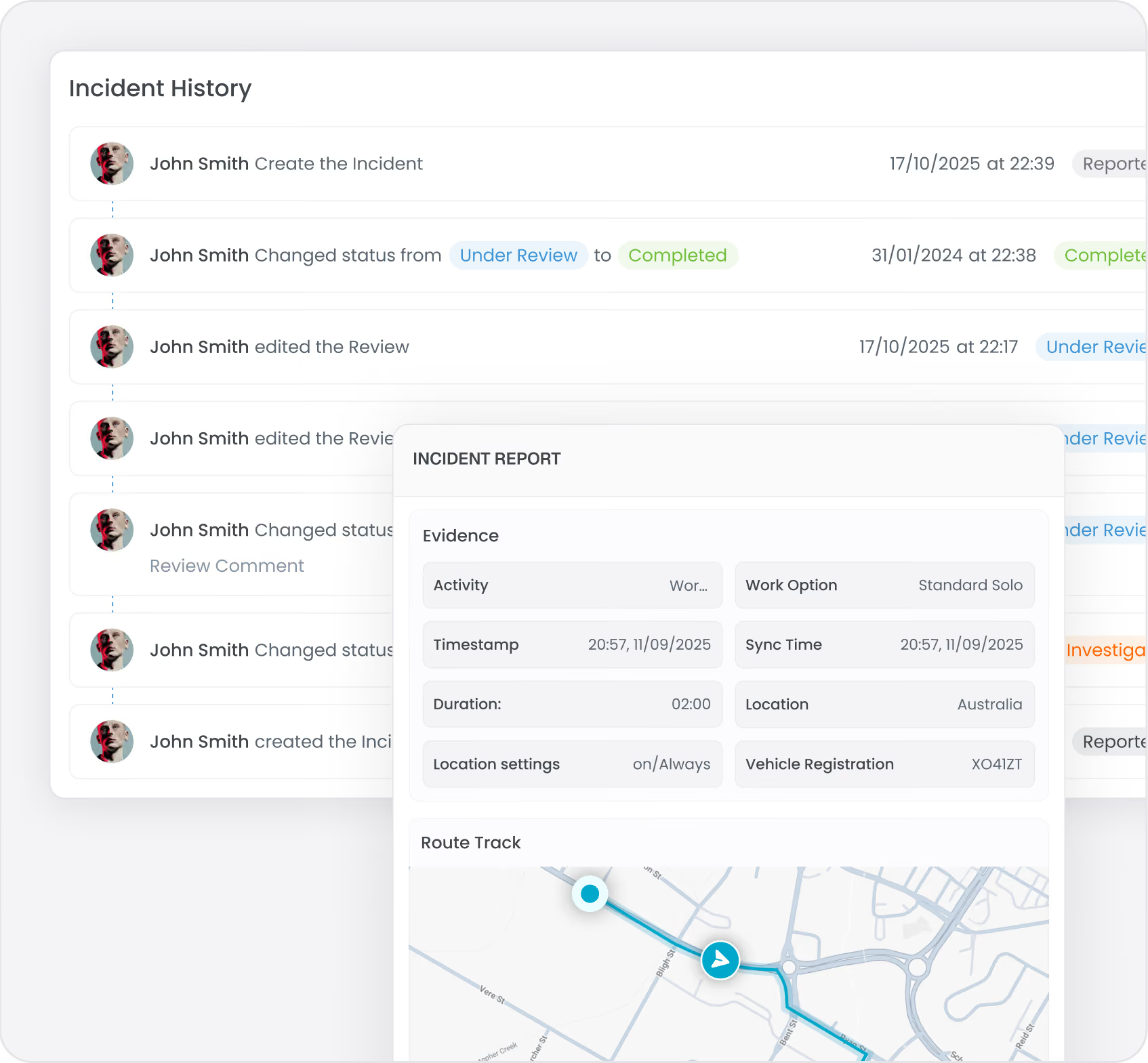
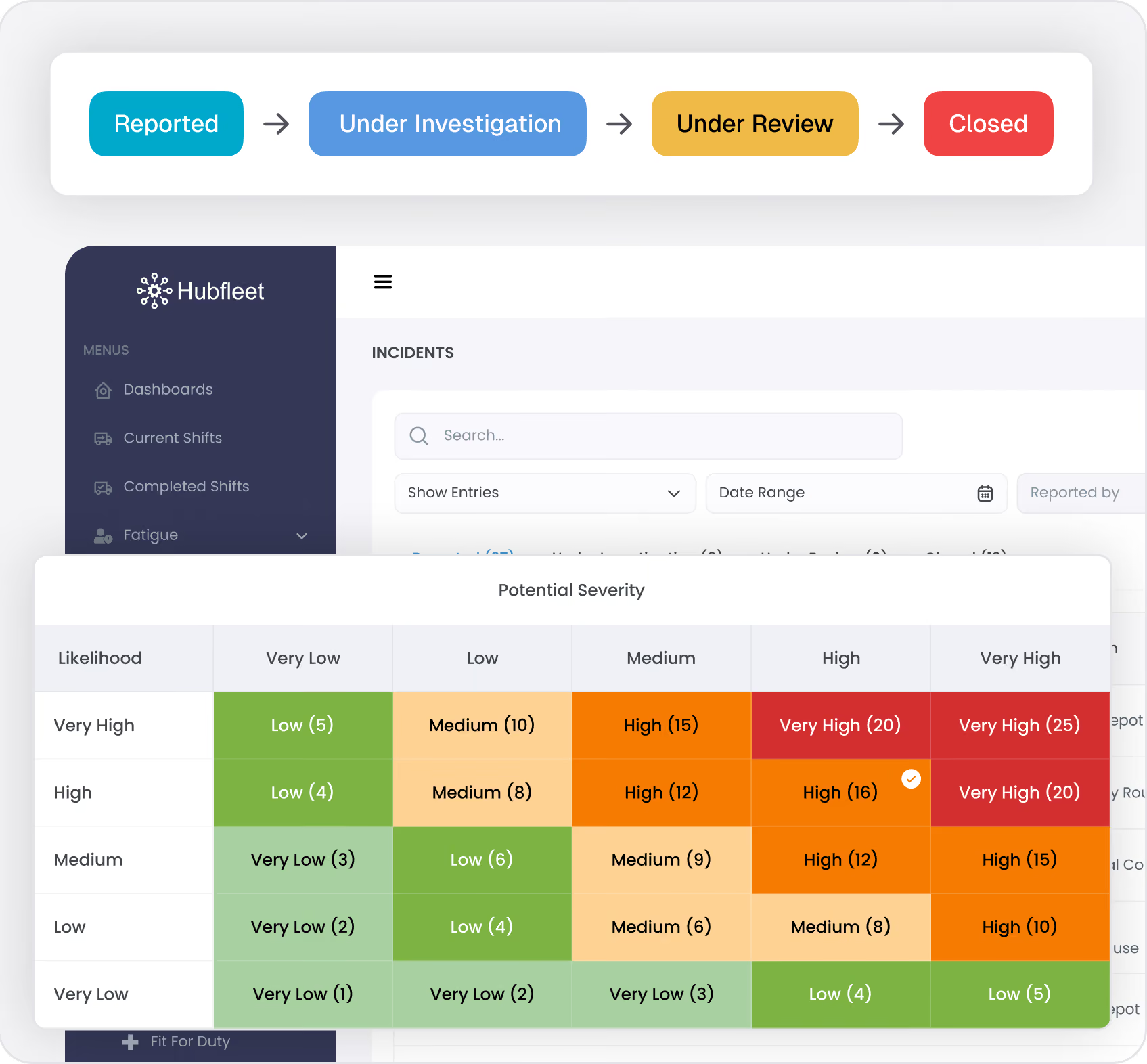
Every incident flows through defined stages with specific requirements at each step:
Reported → Under Investigation → Under Review → Closed
Investigation captures:
  • Sequence of events — Timeline of what happened leading up to and during the incident
  • Contributing factors — Conditions, decisions, and circumstances that contributed
  • Root cause analysis — Why did this happen? What systemic issue allowed this event to occur?
  • Controls assessment — Which controls were in place? Did they work? Did they fail? Were controls missing?
  • Additional evidence — Attach further photos, witness statements, EWD records, telematics data, or GPS tracks
Risk assessment is mandatory
Incidents cannot move to "Under Review" without a completed risk assessment using the 5×5 matrix. This ensures every safety event receives proper risk evaluation, not just a subjective opinion.
Link to controls:
During investigation, identify which controls from your Risk Controls were relevant. If a control was in place and the incident still occurred, that's evidence the control needs strengthening. If no control existed for this risk, that's a gap to fill. This reactive linking builds the evidence chain auditors need.

Assign Corrective Actions

Investigation without action changes nothing. Hubfleet ensures every incident drives improvement through tracked corrective actions.
For each corrective action:
  • Specific description — What exactly needs to be done
  • Assigned owner — Named person responsible for completion
  • Due date — Clear deadline for action
  • Priority level — Urgency based on risk assessment
  • Completion evidence — Photos, documents, or notes proving the action was taken
Driver acknowledgement:
When corrective actions are issued to drivers, they receive a notification in the app and must acknowledge receipt. This creates documented evidence that the driver was informed and understands what's required.
Overdue tracking:
Open and overdue corrective actions are visible on the dashboard. Automated reminders ensure actions don't slip through the cracks. Management can see at a glance which incidents have outstanding actions.
All corrective actions across the platform
From incidents, hazards, NCRs, and audits — feed into a unified Corrective Actions Register. One place to track every improvement action in your organisation.

Close with Complete Evidence

Incidents move to Closed only when:
  • Investigation is complete with root cause identified
  • Risk assessment is documented
  • Corrective actions are assigned, completed, and verified
  • Controls have been reviewed and updated if needed
The complete incident record —
From initial report through investigation, risk assessment, corrective actions, and closure — creates an unbroken evidence chain. Every decision timestamped, every action attributed to a person, every outcome documented.
This is the evidence that proves continuous improvement. An auditor can follow the thread: event occurred → investigation found root cause → corrective action implemented → control strengthened → similar incidents declining. That's PSOE "Effective" evidence.

Pattern Analysis: Learning from Incidents

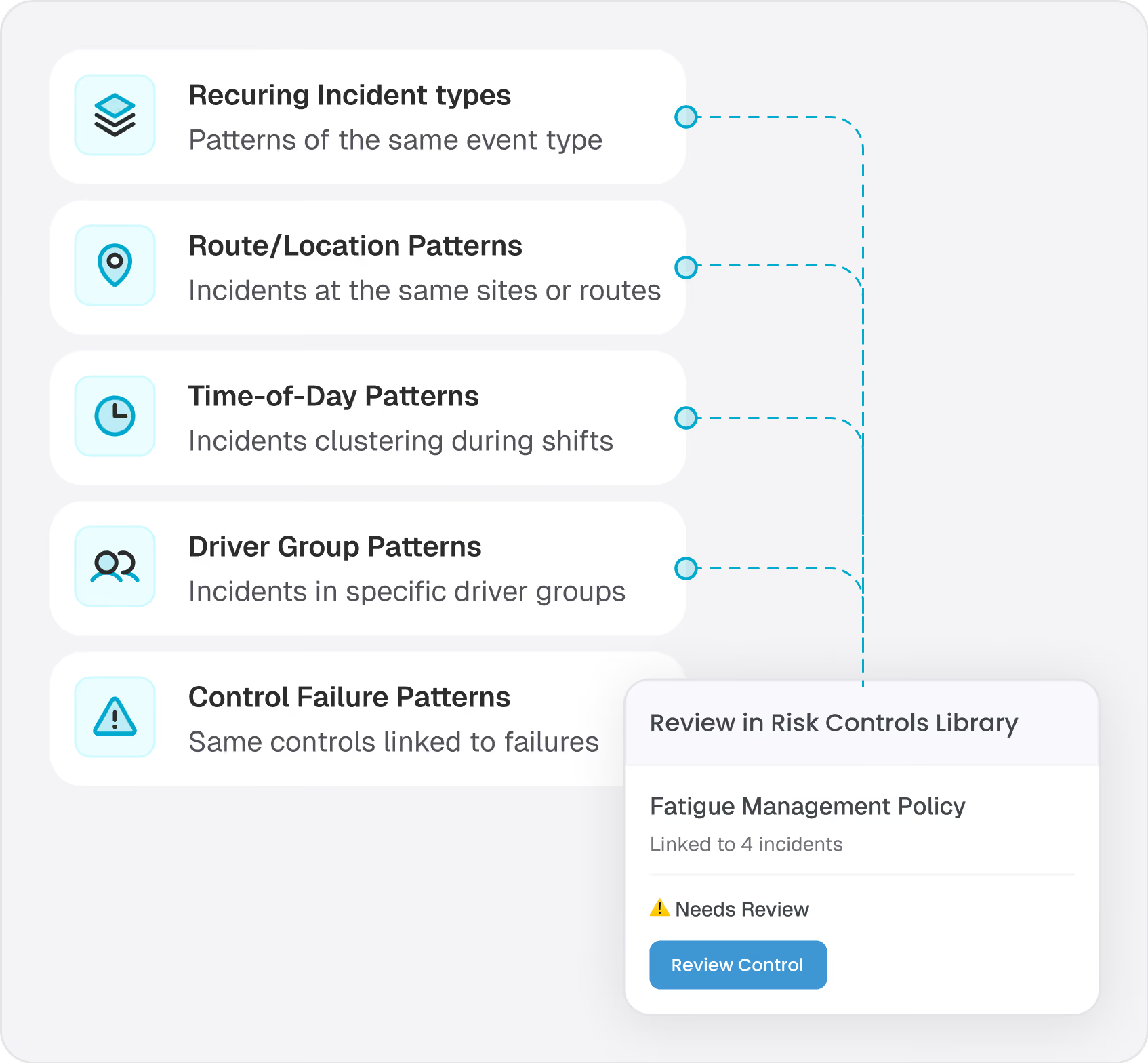
What to look for:
  • Recurring incident types — Same category of events happening repeatedly signals ineffective controls
  • Route/location patterns — Multiple incidents at the same location or on the same route
  • Time-of-day patterns — Incidents clustering around night shifts, early starts, or end of long shifts
  • Driver group patterns — New drivers, specific depots, or particular roster patterns
  • Control failure patterns — The same control linked to multiple incidents means it's not working
When a control from your Risk Controls appears in multiple incident investigations, that's a clear signal it needs review. The reactive linking model makes this visible — you can see which controls are being tested by real-world events and whether they're passing or failing.

HVNL reforms SMS Compliance

Blue user profile icon with a circular head and curved shoulders on a white background.
Outcome Area 2: Risk Management
Incident investigation is the reactive complement to proactive hazard identification. Together with Hazard Reporting, they form the complete risk identification picture — risks found before events (hazards) and risks revealed by events (incidents).
Blue user profile icon with a circular head and curved shoulders on a white background.
Outcome Area 4: Assurance, Monitoring and Improvement
Incident investigation and corrective action tracking directly address the continuous improvement requirement. Auditors will look for evidence that:
  • Safety events are investigated systematically
  • Root causes are identified (not just symptoms)
  • Corrective actions are implemented and verified
  • Incident trends show improvement over time
PSOE Audit Evidence
Icon of a document with a shield symbol in front, representing document security or protection.
Present
Incident management system configured with categories, workflows, investigation templates, and corrective action tracking
Blue gear icon with a shield symbol indicating security or protection.
Suitable
Investigation process appropriate for operation size and risk profile; mandatory risk assessment ensures consistent evaluation
Two overlapping gear icons, one large blue gear behind a smaller black gear.
Operating
Active incident records with investigation details, risk assessments, corrective actions, and closure evidence
Arrow hitting the bullseye of a blue target.
Effective
 Declining incident rates in areas where corrective actions have been implemented; corrective action closure rates high; pattern analysis driving control improvements
See PSOE Evidence Framework Guide: Demonstrating SMS Compliance Under HVNL  reforms for detailed guidance on building audit-ready evidence.
Get Started in Days, Not Months
Free guides, tools, and frameworks to start preparing for HVNL today — built by Australian compliance specialists and trusted by 500+ fleets.
Blue binder or folder with three horizontal black lines on the front cover.
HVNL Compliance Guide
What HVNL means for your fleet — explained in plain English
  • All 5 SMS outcome areas explained
  • Implementation timeline & milestones
  • Fleet preparation checklist
  • Gap assessment framework
  • Change summary from current HVNL
Read the Guide
HVNL Compliance Toolkit
Free downloadable templates to start preparing today.
  • Gap analysis template (5 outcome areas)
  • Pre-audit readiness checklist
  • SMS implementation tracker
  • PSOE evidence mapping
  • Implementation timeline template
Get the Free Toolkit
Audit Preparation Guide
The questions NHVR auditors ask — and where to find your answers.
  • Common auditor questions by outcome area
  • Direct answers showing where evidence sits in Hubfleet
  • PSOE framework explained
  • Audit-day preparation checklist
  • Real auditor scenarios
Read the Audit Guide

Every Incident Is an Opportunity to Improve

Green check mark icon inside a rounded white square.
Structured investigation
Defined stages with mandatory requirements at each step
Green check mark icon inside a rounded white square.
Root cause analysis
Identify why events happen, not just what happened
Green check mark icon inside a rounded white square.
Mandatory risk assessment
Every incident risk-scored with 5×5 matrix
Green check mark icon inside a rounded white square.
Corrective actions
Assigned, tracked, and verified with complete evidence
Green check mark icon inside a rounded white square.
Controls linking
Connect incidents to your Risk Controls Library for effectiveness tracking
Green check mark icon inside a rounded white square.
Pattern analysis
Identify recurring issues and systemic control gaps
Green check mark icon inside a rounded white square.
Continuous improvement evidence
Prove to auditors that your SMS learns from events
Icon
Structured investigation — Defined stages with mandatory requirements at each step
Icon
Root cause analysis — Identify why events happen, not just what happened
Icon
Mandatory risk assessment — Every incident risk-scored with 5×5 matrix
Icon
Corrective actions — Assigned, tracked, and verified with complete evidence
Icon
Controls linking — Connect incidents to your Risk Controls Library for effectiveness tracking
Icon
Pattern analysis — Identify recurring issues and systemic control gaps
Icon
Continuous improvement evidence — Prove to auditors that your SMS learns from events
Icon
Simple pricing — Included in Safety Management add-on at $6/driver/month

Turn safety events into safety improvements.

Stylized blue paper airplane icon with shadow on transparent background.
Start Free Trial
Recommended for most fleets
Best if you're ready to get drivers logging now and explore Hubfleet at your own pace.
Icon
Full platform access — every feature, no limits
Icon
Drivers can start on EWD today
Icon
Real EWD, SMS, and compliance reporting from day one
Icon
No upfront costs · No lock-in contract
Start Free Trial
Icon of a calendar with blue top binder and dark gray date display area.
Book your Demo
Best for larger fleets or complex setups
Best if you've got specific integration questions, multiple sites, or want a tailored walkthrough first.
Icon
Tailored to your fleet and use case
Icon
30 minutes with a Hubfleet specialist
Icon
See the platform mapped against your fleet's compliance obligations
Icon
Get HVNL and SMS questions answered live
Book your 30-Minute Demo
Want to see plans first?
Icon
500+ Australian operators
Icon
NHVR approved
Icon
Free trial
Icon
Australian-based support