

Mapping the NHVR Master Code to Hubfleet
The companion guide to How to Build Your SMS in Hubfleet. Use the Master Code (RICP) as your SMS blueprint — Activity by Activity, Hazard by Hazard.
The NHVR Master Code of Practice (also known as the RICP — Registered Industry Code of Practice) is registered under section 706 of the Heavy Vehicle National Law (HVNL) and is admissible in court under section 632A as evidence of what reasonably practicable safety management looks like. The 2026 edition, released by NHVR in January 2026, has been updated to align with the upcoming HVNL reforms.It lists 45 Activities, 530 supporting Controls, and 75 specific Hazards across 12 categories — making it the most authoritative starting point for any heavy-vehicle SMS, whether you're complying with the current HVNL today or preparing for HVNL reforms.
This page is the companion to How to Build Your SMS in Hubfleet. Where that guide walks you through the SMS foundation, this one goes deeper on the source material and shows how every NHVR item lands inside Hubfleet.
This page is the companion to How to Build Your SMS in Hubfleet. Where that guide walks you through the SMS foundation, this one goes deeper on the source material and shows how every NHVR item lands inside Hubfleet.
Who this page is for
You've read Part 1 of How to Build Your SMS in Hubfleet and you're asking "where exactly does each NHVR Activity, Control and Hazard live in Hubfleet?" This page answers that — and shows how each Master Code requirement under the Heavy Vehicle National Law (HVNL) lands in your Hubfleet workspace.
The benefits of using the Master Code as your starting point:
- Audit-ready — trace every Hubfleet record back to a NHVR Activity and Hazard code
- Faster setup — use the Master Code as a starting checklist instead of building from scratch
- Defensible — demonstrate that your SMS is structured around the regulator's own framework
The three layers of the NHVR Master Code
The Master Code is structured in three connected layers. Each maps to a different concept in Hubfleet.
NHVR layer
What it is
Examples
Activity
A category of work a CoR party performs (45 in total, numbered 1–45)
13 — Managing driver fatigue
26 — Scheduling transport tasks
32 — Restraining loads
26 — Scheduling transport tasks
32 — Restraining loads
Control
A specific practice or measure within an Activity
13.21 — Install Fatigue and Distraction Detection Technologies
32.1 — Provide load restraint equipment with sufficient capacity
32.1 — Provide load restraint equipment with sufficient capacity
Hazard
A specific risk source, with a coded ID (H1a–H12k)
H4a — Driver impaired by fatigue
H7a — Load not adequately restrained
H9b — Over mass vehicle
H7a — Load not adequately restrained
H9b — Over mass vehicle
How the NHVR model lands in Hubfleet
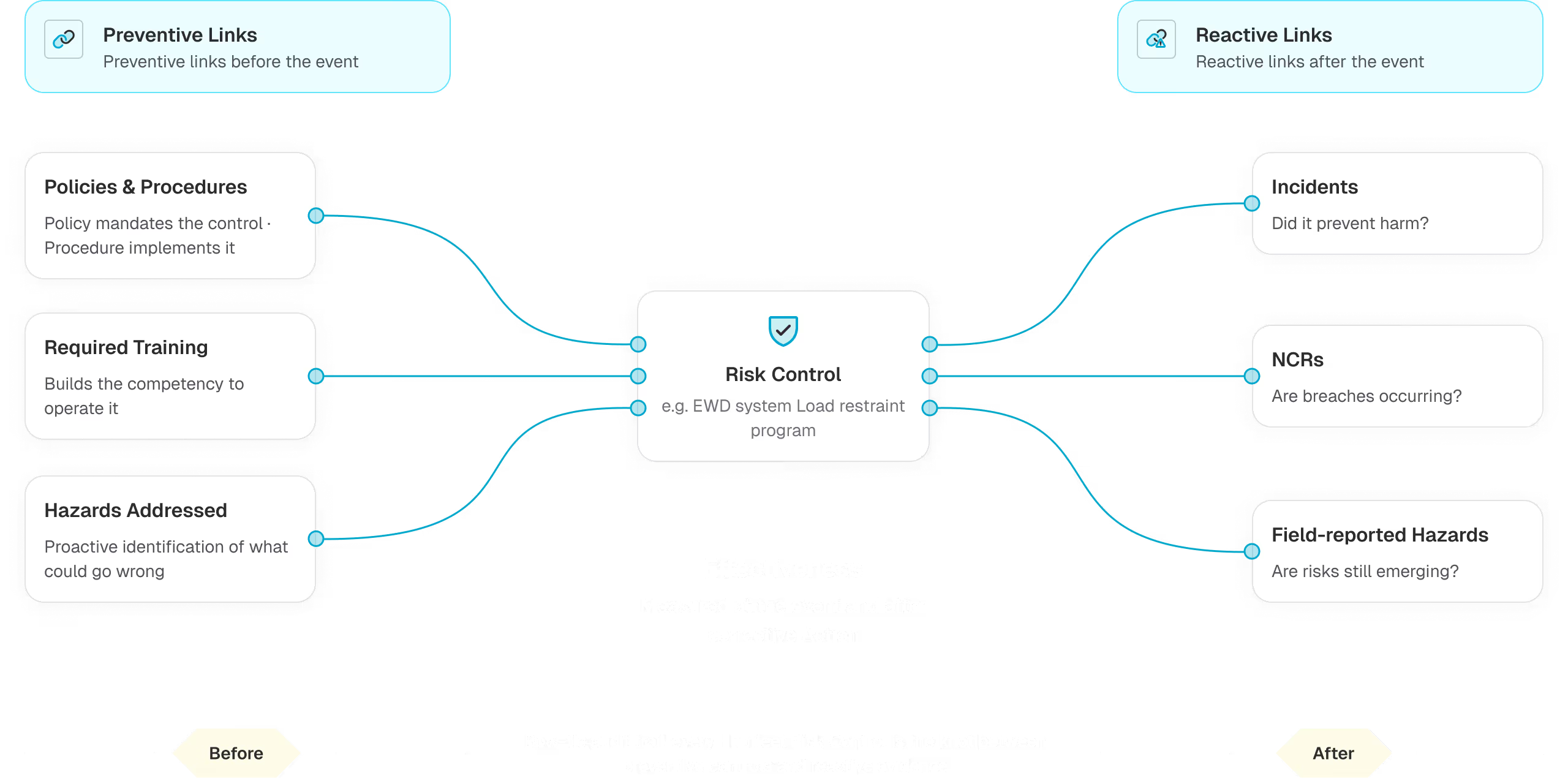
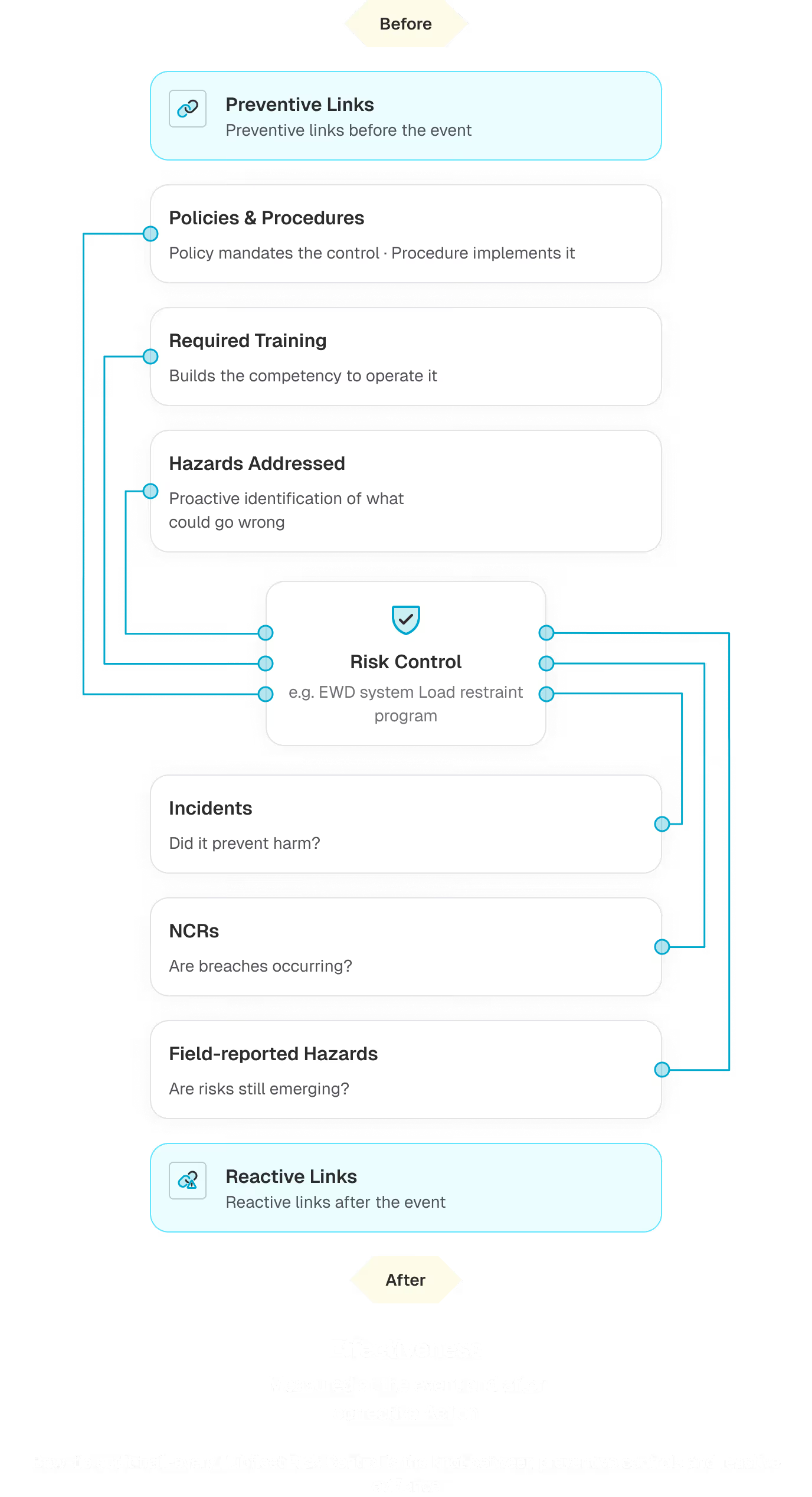
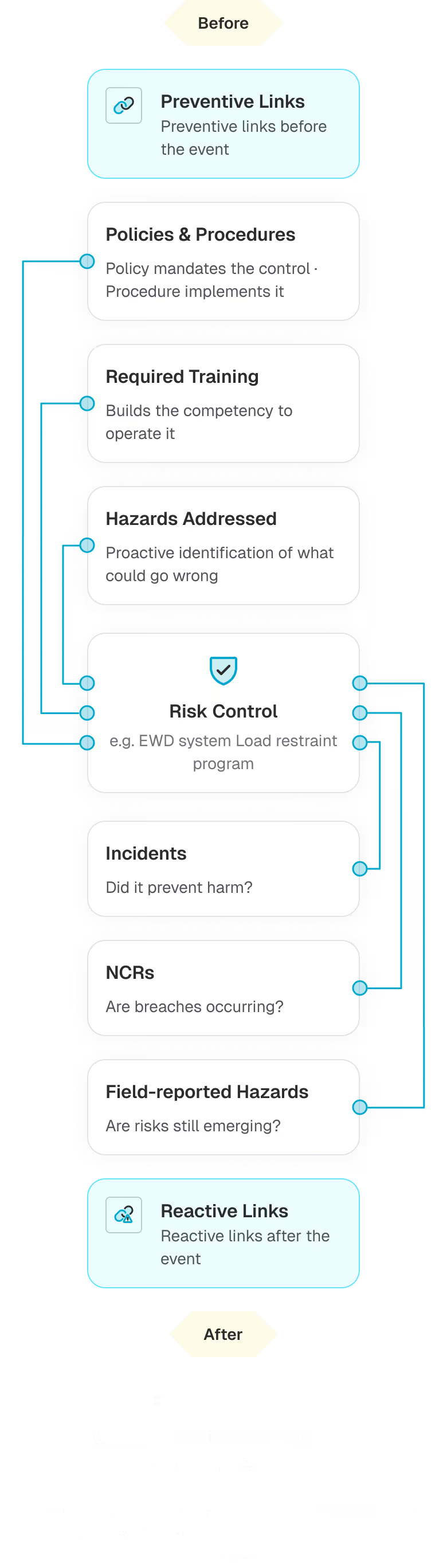
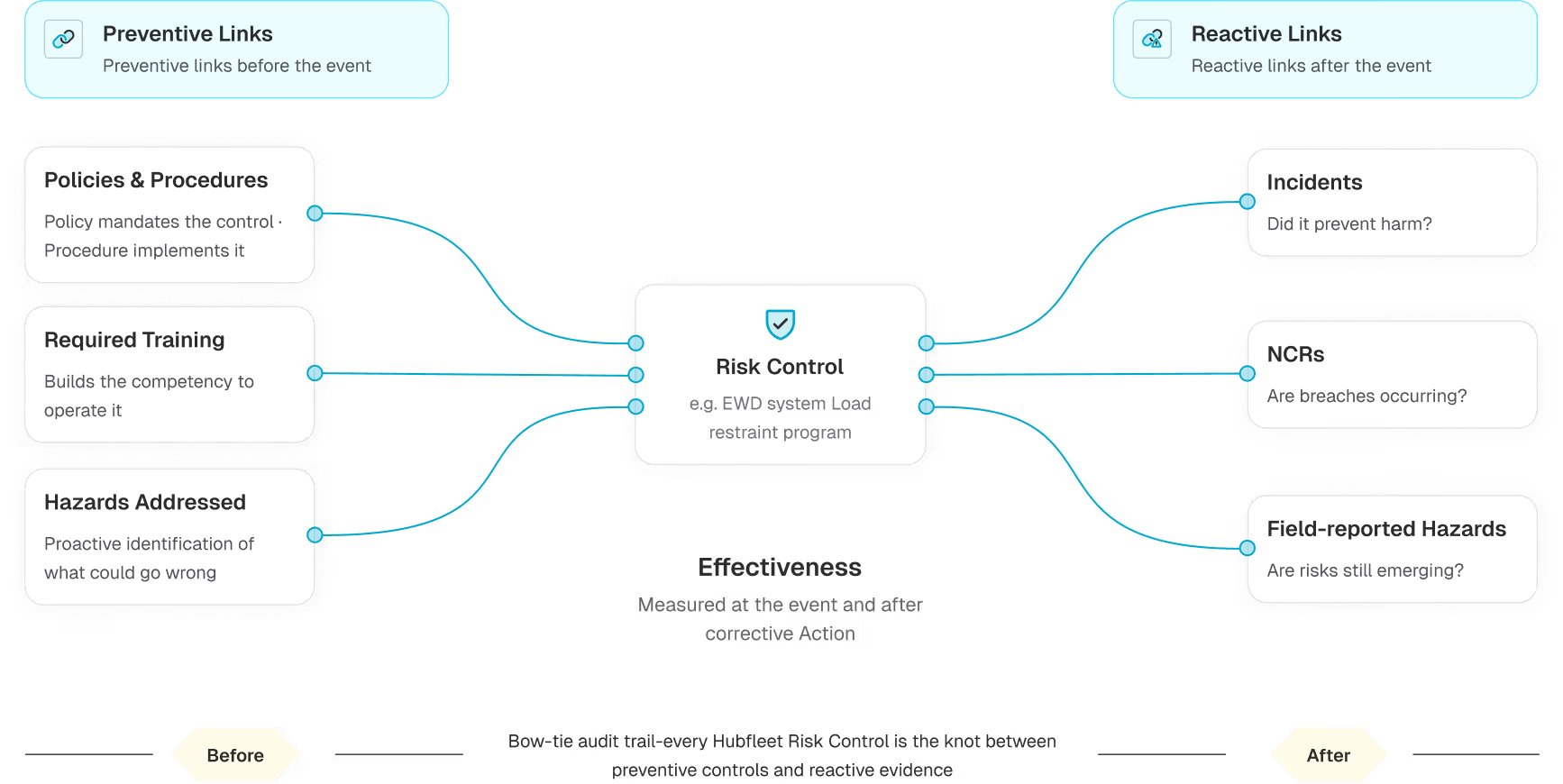
In the NHVR model: Activities contain Controls → Controls mitigate Hazards.
In Hubfleet, this lands differently:
- NHVR Activity is a tag/category on a Risk Control — Hubfleet does not have a separate Activity entity, and you don't need one
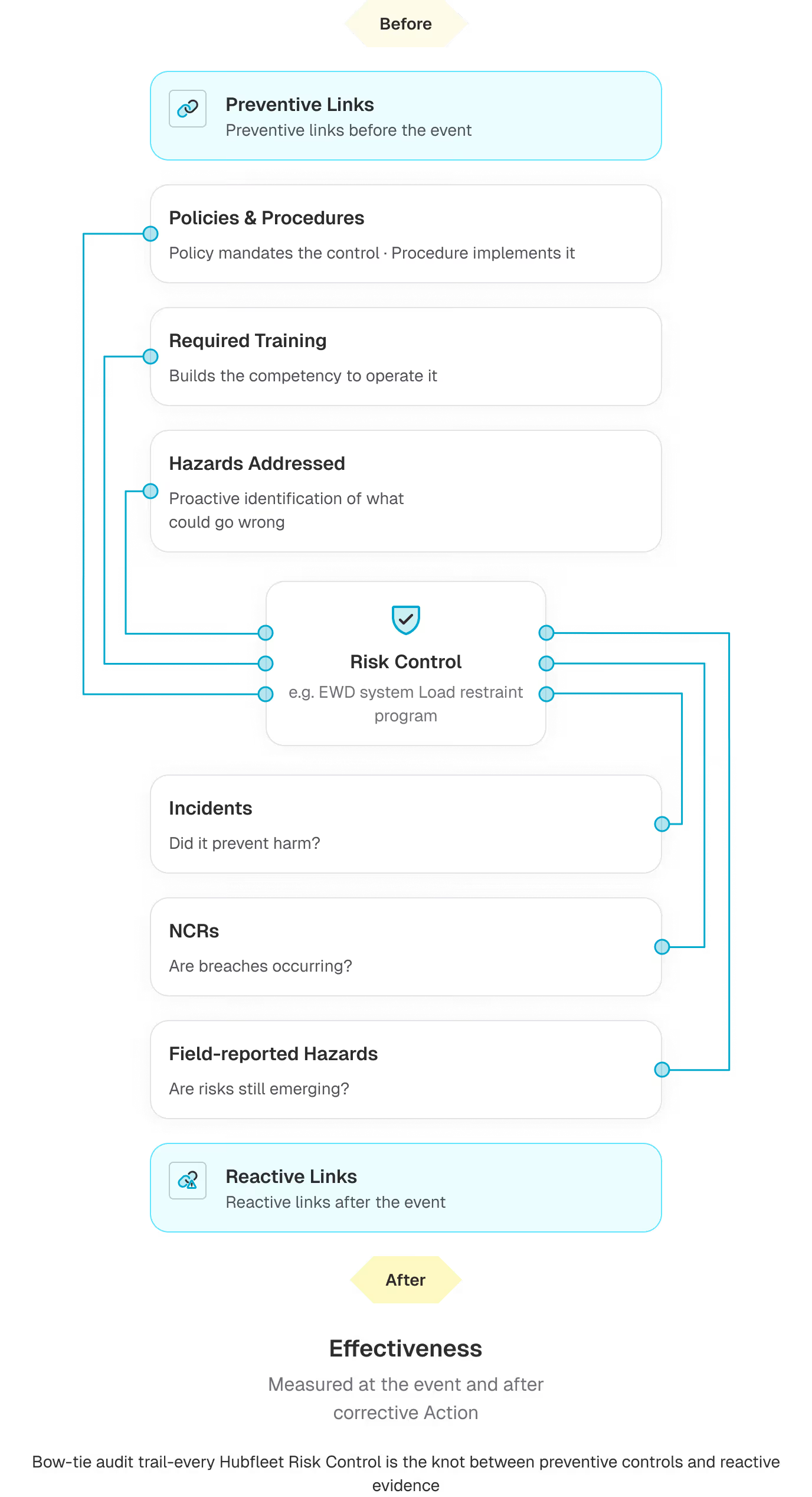
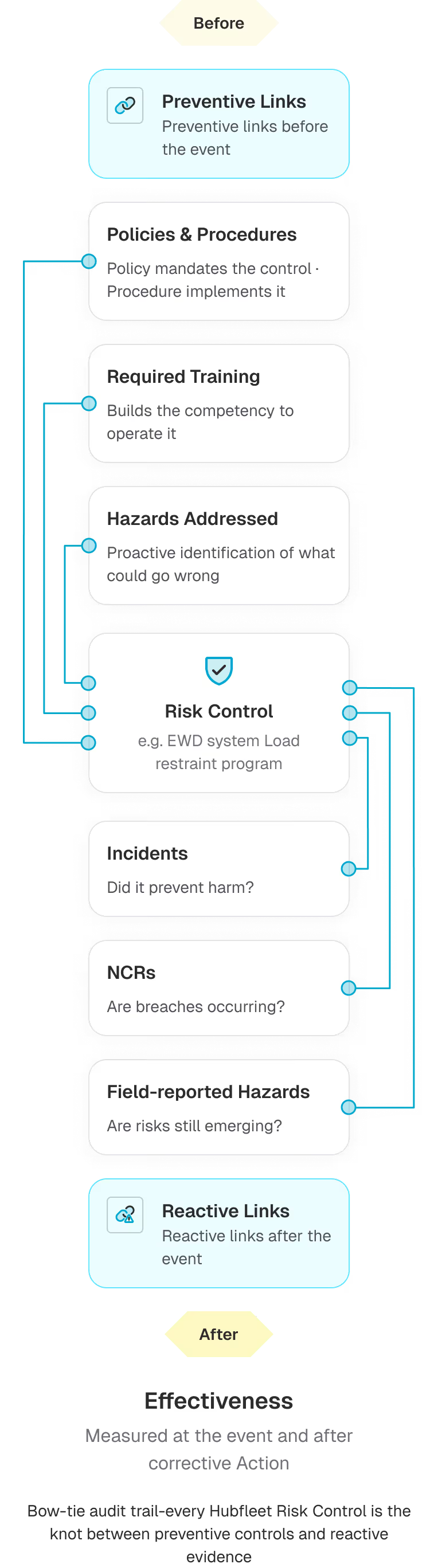
- A Risk Control is the systemic, ongoing safeguard (e.g. "EWD system", "Load restraint equipment program")
- Each Risk Control has Preventive Links — policies, required training, and hazards addressed (the left side of the bow-tie)
- Each Risk Control has Reactive Links — incidents, NCRs, and field-reported hazards that have tested the control in real life (the right side of the bow-tie)
- Inside each Hazard, Incident, or NCR there are Actions — specific, time-bound corrective work (e.g. "Replace damaged straps by Friday"). Actions are not Risk Controls; they are the work that runs alongside the systemic Risk Control to address a particular event
How each NHVR item maps to Hubfleet
Not every NHVR "Control" should become a Hubfleet Risk Control. The Master Code mixes concrete safeguards with policies, training requirements, and governance items. Here's where each kind belongs:
NHVR item type
Map to Hubfleet entity
Examples from the Master Code
Activity (1–45)
Tag on a Risk Control — no separate entity in Hubfleet
Activity 13 — Managing driver fatigue
Activity 26 — Scheduling transport tasks
Activity 32 — Restraining loads
Activity 26 — Scheduling transport tasks
Activity 32 — Restraining loads
Hazard (H1a–H12k)
Hazard record — tag with the H-code
H4a → "Driver fatigue" hazard
H7a → "Load not restrained" hazard
H7a → "Load not restrained" hazard
Concrete physical or system safeguard
Risk Control — tag with NHVR Activity #
13.21 Install FDDT
19.1 Service & maintenance schedule
22.2 Traffic management plan
36.1 Calibrate weighbridges
19.1 Service & maintenance schedule
22.2 Traffic management plan
36.1 Calibrate weighbridges
Policy, contract term, or written rule
Policy or Procedure — linked under Preventive Links
1.1–1.16 Safety capability statements
3.1 CoR Policy
10.1–10.12 Agreement terms
11.7–11.10 Employment contract terms
3.1 CoR Policy
10.1–10.12 Agreement terms
11.7–11.10 Employment contract terms
Training or competency requirement
Required Training — linked under Preventive Links
5.1–5.17 Training employees
15.1–15.22 Training drivers
22.6–22.10 Premises staff training
41.4–41.5 Dangerous goods training
15.1–15.22 Training drivers
22.6–22.10 Premises staff training
41.4–41.5 Dangerous goods training
Vehicle, equipment & pre-operational checks
Fleet management • Pre-start checklists
18.1–18.7 Vehicle procurement
19.8–19.10 Pre-start checks
20.1–20.10 Equipping vehicles
19.8–19.10 Pre-start checks
20.1–20.10 Equipping vehicles
Allocation & scheduling decisions
EWD / fatigue-hours visibility — Hubfleet shows allocators and schedulers each driver's remaining work hours and time to next major break, supporting (not replacing) the human decision
25.1–25.10 Driver allocation
26.1–26.22 Scheduling
28.1–28.10 Vehicle allocation
26.1–26.22 Scheduling
28.1–28.10 Vehicle allocation
Route planning
Policies & Procedures (route policy) + Risk Controls for route-specific hazards. Hubfleet does not include a route planner
27.1–27.17 Route planning and selection
Governance / SMS practice
SMS Manual or CoR Policy document
1.1–1.16 Safety capability
2.1–2.4 Executive understanding
7.1–7.9 Working with other businesses
8.1–8.6 Monitoring & assurance
9.1–9.9 Sharing information
2.1–2.4 Executive understanding
7.1–7.9 Working with other businesses
8.1–8.6 Monitoring & assurance
9.1–9.9 Sharing information
Building your SMS from the Master Code (RICP)
This is the condensed build path. For the full step-by-step playbook with timing and dependencies, read How to Build Your SMS in Hubfleet.
Set up your Hazard register
For each NHVR hazard relevant to your operation, create a Hazard record and tag it using the dedicated NHVR Hazard Code field (e.g. H4a — Driver fatigue impairment, H7a — Load not adequately restrained, H9b — Over-mass vehicle).
Build your Risk Control library
For each concrete safeguard you implement, create a Risk Control and tag it using the dedicated NHVR Activity field — a single Risk Control can cover multiple Activities (e.g. an EWD system covers Activity 13 and 17).
Link Preventive items
Under each Risk Control, link Policies & Procedures, Required Training, and the Hazards it addresses. This is the left side of the bow-tie — what's in place before anything goes wrong.
Let Reactive Links populate themselves
As you record Incidents, NCRs and field-reported Hazards, link them to the relevant Risk Control. Each linked event captures Effectiveness (Event) — how the control performed at the time — and Effectiveness (Post-Action) — how it performs after corrective work. This is your bow-tie audit trail; auditors look for exactly this structure under HVNL reforms.
Re-rate after action
When actions are completed against a hazard or incident, perform a re-rating in the review section. Hubfleet sends an automatic Risk Re-Assessment Notification email to the Category Owner showing the original vs new rating.
Foundation Activities — where governance items live
The Master Code groups its 45 Activities into 8 sections — Foundation (1–10), Managing Drivers (11–17), Vehicles & Equipment (18–20), Premises (21–22), Operations (23–24), Journey Planning (25–29), Loads, Loading & Unloading (30–36), and Sector Specific (37–45). The Section column in the table above shows where each Activity sits.
Most of the Foundation section (Activities 1–4 and 7–10) is governance and SMS practices, not protective controls. Activities 5 (Training employees) and 6 (Managing fitness to work) are operational and do map directly to Hubfleet (Required Training and Risk Controls respectively). Examples of governance items that should not become Risk Controls:
- 1.1 "Demonstrate a commitment to safety throughout the business"
- 2.1–2.4 "Ensure executives understand the business"
- 8.3 "Use audits or internal reviews as part of the assurance process"
- 9.1 "Determine the information you need to carry out your transport activities safely"
Capture these in your CoR Policy document or your SMS Manual and reference them when an auditor asks about Foundation Activities.
Mapping table — all 45 NHVR Activities
Copy this table into Excel or Google Sheets to use as a tracking checklist. Each row tells you the primary Hubfleet entity for that Activity, plus any secondary entities to also consider.
#
Section
NHVR Activity
Primary Hubfleet entity
Also see
1
Foundation
Developing organisational safety capability
SMS Manual / CoR Policy
Policies & Procedures
2
Foundation
Ensuring executives understand the business
SMS Manual / CoR Policy
Required Training
3
Foundation
Establishing policies and procedures
Policies & Procedures
--
4
Foundation
Recruiting and employing (all employees)
Policies & Procedures
--
5
Foundation
Training employees
Required Training
Risk Controls
7
Foundation
Working with other businesses
Policies & Procedures
SMS Manual
8
Foundation
Monitoring and Assurance
SMS Manual
Risk Control review schedules
9
Foundation
Sharing information
Policies & Procedures
Risk Control review schedules
10
Foundation
Making agreements
Policies & Procedures
--
11
Managing Drivers
Recruiting and employing heavy vehicle drivers
Policies & Procedures
Required Training
12
Managing Drivers
Managing driver health
Risk Controls
Required Training, Policies
13
Managing Drivers
Managing driver fatigue
Risk Controls
Required Training, 📱Electronic Work Diary (EWD), Fatigue Management
14
Managing Drivers
Managing distraction and inattention
Risk Controls
Required Training
15
Managing Drivers
Training drivers
Required Training
--
16
Managing Drivers
Equipping drivers
Risk Controls
--
17
Managing Drivers
Using monitoring devices and safety systems
Risk Controls
--
18
Vehicles & Equipment
Vehicle procurement and fleet management
Fleet management
Policies & Procedures
19
Vehicles & Equipment
Maintaining vehicles and equipment
Risk Controls
Services, Faults, Pre-starts, Maintenance Management
20
Vehicles & Equipment
Equipping and modifying vehicles
Risk Controls
--
21
Premises
Design and characteristics of loading/unloading premises
Risk Controls
Policies & Procedures
22
Premises
Managing loading and unloading premises
Risk Controls
Required Training
23
Operations
Arranging for the transport of goods
Policies & Procedures (CoR)
Risk Controls
24
Operations
Arranging for a vehicle to perform a task
Policies & Procedures (CoR)
Fleet management, Risk Controls
25
Journey Planning
Allocating a driver to a driving task
Risk Controls (Fatigue) + EWD fatigue-hours visibility
Policies & Procedures
26
Journey Planning
Scheduling transport tasks
Risk Controls (Fatigue) + EWD fatigue-hours visibility
Policies & Procedures
27
Journey Planning
Route planning and selection
Policies & Procedures
Risk Controls (route hazards). Hubfleet does not include a route planner
28
Journey Planning
Allocating or accepting a vehicle for a transport task
Fleet management + Risk Controls
Policies & Procedures
29
Journey Planning
Accepting transport tasks as an owner driver
Policies & Procedures
--
30
Loads, Loading & Unloading
Manufacturing and packaging goods
Policies & Procedures
--
31
Loads, Loading & Unloading
Loading
Risk Controls
Required Training, Policies
32
Loads, Loading & Unloading
Restraining loads
Risk Controls
Required Training, Policies
33
Loads, Loading & Unloading
Unloading
Risk Controls
Required Training, Policies
34
Loads, Loading & Unloading
Measuring, communicating and monitoring mass
Risk Controls
Required Training, Mass Management
35
Loads, Loading & Unloading
Measuring, communicating and monitoring dimension
Risk Controls
--
36
Loads, Loading & Unloading
Operating a weighbridge
Risk Controls
Required Training, Policies
37
Sector Specific
Arranging for the collection and transport of livestock
Policies & Procedures
Risk Controls
38
Sector Specific
Running an on-line freight platform
Policies & Procedures
--
39
Sector Specific
Operating on and around construction sites
Risk Controls
Required Training
40
Sector Specific
Recovery vehicles and operations
Risk Controls
Required Training
41
Sector Specific
Transporting dangerous goods or explosives
Risk Controls
Required Training, Policies
42
Sector Specific
Packing and restraining goods in shipping containers
Risk Controls
Required Training, Policies
43
Sector Specific
Importing goods in shipping containers
Policies & Procedures
Risk Controls
44
Sector Specific
Transporting shipping containers
Risk Controls
Required Training
45
Sector Specific
Managing premises where shipping containers are loaded/unloaded
Risk Controls
Required Training
Tips
- A single Risk Control can map to multiple NHVR Activities — tag all that apply.
- Don't try to import every NHVR control as a Risk Control. Use the table above to route each one to the right entity.
- For the governance Foundation Activities (1–4 and 7–10), keep your CoR Policy / SMS Manual aligned and reference NHVR Activity numbers directly in the document. Activities 5 (Training employees) and 6 (Managing fitness to work) are operational — they live in Required Training and Risk Controls, not in the SMS Manual.
- When an auditor asks "how do you address Activity X?", filter Risk Controls by the NHVR Activity tag to produce a defensible list.
Related Solutions

.avif)


Ready to build?

Start Free Trial
Recommended for most fleets
Best if you're ready to get drivers logging now and explore Hubfleet at your own pace.

Full platform access — every feature, no limits
Drivers can start on EWD today
Real EWD, SMS, and compliance reporting from day one
No upfront costs · No lock-in contract
Start Free Trial

Book your Demo
Best for larger fleets or complex setups
Best if you've got specific integration questions, multiple sites, or want a tailored walkthrough first.
Tailored to your fleet and use case
30 minutes with a Hubfleet specialist
See the platform mapped against your fleet's compliance obligations
Get HVNL and SMS questions answered live
Book your 30-Minute Demo
Want to see plans first?


500+ Australian operators
NHVR approved
Free trial
Australian-based support